
Third-party risk & partner programs
Third-party risk management covers the vendors your institution depends on. Partner programs covers the fintech programs your institution sponsors. Both are oversight surfaces built for the questions an examiner asks: who are they, how critical are they, what did you check before you signed, and what have you checked since. The vendor manager works here daily, and the CCO and an independent approver sign the decisions. In the sidebar both sit in the Third parties group, as TPRM for the vendor inventory and Partner programs, beside Inbound questionnaires (DDQ/RFP).
The vendor inventory
Every third party gets a record with a display ID, an owner, a service category, a tier and a status. You can flag a vendor as customer-facing, which adds a consumer compliance due diligence theme, and flag a credit union's CUSO with the NCUA Part 712 oversight fields. The vendor drawer lists the complaints linked to the vendor, and they feed its reassessment basis. Statuses run prospective, approved and awaiting onboarding, active, under review, and offboarded. Onboarding is a request that an independent approver signs rather than a status you set yourself. Offboarding opens an Offboarding checklist covering data return or destruction, access removal, contract termination, final accounting and service transition. Each item is marked done with a note or reopened, and none can be deleted.
Inventory tabs let you filter to critical vendors, concentration exposure, vendors whose SOC report or data-processing agreement is expiring or in renewal, and the spend reconciliation. Contract expiry itself is not on that tab. It lives on the contract panel and in the clause matrix. A second view, the Clause matrix, flips the register on its side so you can see one contract clause across every vendor at once. As on the other registers, you can save a named view, add your institution's own custom fields, and take an audited Import-ready CSV of the whole inventory alongside the stamped exports.
A member with the Business-line owner role sees and works only the vendors they own, including uploading evidence and recording their contracts. See Roles & permissions. Generate TPRM program report files the annual program report for the board as a sealed board report, listed with the other board reports.
Tiering, assessment and due diligence
Tiering runs from four inputs: criticality, data sensitivity, system access and annual spend, each recorded on a short scale. Zovos suggests a tier from those, and you accept the suggestion or set a different tier yourself. Tier drives how much diligence the vendor needs and how often you reassess.
Each vendor also carries a documented inherent and residual risk assessment, before engagement and at each review, as a structured 5 by 5 assessment on the same scoring engine as the risk register. Recording the assessment moves only a suggested residual. The Residual risk panel shows that suggestion beside the residual on record, and the record moves only when a named person confirms it against the evidence. A periodic reassessment is kept as a Reassessment record. Zovos drafts the basis from everything that changed since the last review, the reviewer records a decision, and the basis is frozen onto it. The vendor badges as due soon or overdue against its cadence.
Diligence is a questionnaire plus artifacts. You send a due-diligence questionnaire to the vendor through an external portal. The respondent gets a scoped, expiring link rather than a login, bound to that recipient with an emailed one-time code and a cap on its reuse, and any file they upload is quarantined until it passes a malware scan. When email is on, Zovos mails the link to the vendor contact. When it is off, Zovos shows the link to you once, with a copy button, so that you can pass it to the vendor yourself. The confirmation says which of the two happened, and the link is not shown again after that. Questionnaires are issued from versioned Questionnaire templates, which you manage in Settings under Data & retention. Import SIG / CAIQ brings in a question set from a CSV or Excel export as a new version, and you choose which version new questionnaires use or retire one. A template is never edited in place, and each questionnaire shows the template and version it was issued from. Answers the vendor gave in an earlier cycle are carried forward and flagged for re-confirmation.
The default questionnaire asks every vendor about its use of AI, and what a vendor discloses is registered. A cross-vendor due diligence queue shows what is outstanding across the inventory.
Alongside the questionnaire you collect the SOC report, financials, the vendor's continuity plan and insurance certificates. You can also request a penetration test summary, licenses and a privacy policy, and make any of them required for a tier. Files a vendor uploads show as unverified in your views until your team reviews them. A financial review links to the financials artifact it read, and a critical vendor's BCP and DR test results can be reviewed and tied to the processes that depend on the vendor. Each vendor carries a SOC state (current, expiring, or an exception where it was never collected) and a DPA state (active, in renewal, or missing), so a gap reads as a gap instead of an empty cell. A renewal panel reads the SOC and DPA cadence across the inventory over a window you pick, which can be the coming month, quarter, half-year or year. An artifact that has already lapsed stays on the list whatever window you choose, and reads as overdue by so many days.
Questionnaires after an industry event
When an incident hits a provider many institutions use, send one short questionnaire to many vendors at once and track the responses. Filter the survey by the system each vendor is linked to, start from a template, and produce a one-page exposure PDF for management.
Questionnaires you answer
Inbound questionnaires (DDQ/RFP) works the other direction. It is the intake for due-diligence and RFP questionnaires that your institution has to answer. You paste the questions in, supply them as CSV, or upload an Excel or Word file. The drafting agent proposes an answer to each question with its supporting citations, a confidence score and a review state, and flags the answers it is unsure of. You review and edit the answers, and then export the set as a CSV, or into the requester's own XLSX file. Each inbound questionnaire records its requester, a due date and an owner, and each question can be assigned to a colleague, who sees it in My work and can open it there. A retired policy section never feeds an answer or an export.
SOC review and remediation
Collecting a SOC report is not the same as reviewing it, and the review here is substantive. One SOC review covers SOC 1, SOC 2 and SOC 3 reports, bridge letters, complementary user entity controls and exceptions. You record items against the report by kind. The kinds are testing exceptions, CUECs, carve-outs where a fourth party was excluded, period gaps against your fiscal year, and opinion flags. CUECs are complementary user entity controls, the controls you have to run for the vendor's opinion to hold. The opinion itself is recorded as unqualified, qualified, adverse or a disclaimer. The SOC Reviewer agent can extract candidate items from the report to save the first pass. Every candidate requires explicit confirmation before it becomes part of the review, and any excerpt the agent could not ground in the document is badged as such.
What the review turns up becomes work in the vendor's Action items panel. An action item can be raised only from a confirmed SOC exception, a contract clause recorded as absent, or a due-diligence answer that does not hold, and the source excerpt is frozen onto it. Its due date follows from the severity you pick. The vendor works its items through a scoped, expiring remediation link and can mark one ready. That link follows the same rule as the questionnaire link. It is mailed when email is on, and otherwise it is shown to you once to pass on. That mark shows as the vendor's claim, and only your team closes an item, with a recorded rationale.
Contracts, concentration and shadow vendors
A contract records its signing date, and the Bank Service Company Act notice clock runs from the earlier of signing and the start of performance. At renewal you record a renewal decision, which withdraws the contract-notice reminders, and a contract that renewed with no decision recorded shows as renewed by default. A contracted recovery time objective carries through the contract import and register migration. Each critical vendor needs an exit plan, and a critical vendor without one is flagged.
Contracts carry a required-clause checklist, with each clause marked present, absent, not applicable, or unreviewed. That fourth state matters, because "we have not looked" is different from "it is not there". The contract panel also records the term, the non-renewal notice window, auto-renewal, the right to audit, the breach-notice period and SLA metrics with their met or missed outcomes, and badges a contract nearing its notice date. The Contract Reviewer agent can read the executed contract and propose its terms and a finding for each required clause. A person accepts or rejects each proposal, and nothing on the contract changes on its own. An uploaded contract is scanned for malware first. Until the scan comes back clean the file cannot be downloaded and the Contract Reviewer cannot read it, and a file that fails the scan is quarantined.
Concentration risk shows the largest exposure in each service category, weighted by spend where accounts-payable spend has been reconciled and by vendor count otherwise. Each exposure carries an exit-difficulty rating, from readily substitutable to no viable alternative, and that rating adjusts how the exposure reads against your appetite. Each vendor lists its Fourth parties, and a provider named by two or more of your vendors surfaces as fourth-party concentration. Shadow-vendor reconciliation takes an accounts-payable spend export as a CSV or an Excel workbook and surfaces payees with no record in your inventory, each of which you match, dismiss or promote into the register.
A vendor's security or financial-health rating is recorded by hand on its profile, with the score as the provider states it, the source, the as-of date, an optional note and an optional cited evidence item. Ratings build a history rather than overwriting a single number, each one recorded appends a monitoring event to the vendor record, and the latest rating shows in the TPRM program report. It never silently forces a reassessment. Zovos has no rating feed from a ratings provider.
Partner programs
Partner programs is the sponsor-bank and banking-as-a-service surface. It holds one record per fintech program, pointed at the partner in your vendor register. Each program opens on a strip of tabs: the dossier, due diligence, the exit runbook, ongoing monitoring, complaints and UDAAP, oversight appetite, and the partner's BSA/AML metrics. The partner's own AML/CFT officer designation is recorded, and the exit plan has to exist before launch rather than after the relationship sours.
Program status runs proposed, onboarding, live, wind-down and exited. A live program is flagged when the requirements of its go-live gate stop holding, and the evidence on a closed diligence packet is locked. The live and exited states are earned through gates rather than set from a dropdown. Gate chips have exactly two states, met or blocked. There is no amber, because an amber gate is a silent pass.
A failed diligence item is never cleared. The maker records why the institution would proceed with the failure, an approver accepts or refuses that waiver, and the line stays a failure on the packet either way. A waiver is a documented decision, and it does not erase the failure. Opening the diligence packet freezes a snapshot of the platform's checklist pack at that moment, so a later edit to the template cannot change what was actually signed.
Overseeing a live program
The fintech can answer your diligence itself. Mint a scoped link to the program's open diligence lines, send it to the partner contact, see every link that can currently reach the packet, and kill one when it has served its purpose. Answers arrive marked as unverified submissions awaiting your review, counted beside the blocking items and never inside them. The partner's own assertion never closes a gate on its own.
The exit runbook is a tracked plan rather than a checklist. Every wind-down obligation carries an owner, a target date and an execution status of not started, in progress or blocked, with complete earned by a recorded result rather than a tick. Each line ages through no target date, on track, due soon, or overdue. Overdue lines badge on the tab and reach the reminder feed. A wind-down plan nobody is working becomes visible while the program is still live, which is the only time it can be fixed.
Oversight appetite puts threshold lines on the program figures a sponsor bank is examined on: complaints attributed to the program, marketing reviews flagged in advertising and UDAAP review, monitoring exceptions per hundred items sampled, and the age of the oldest unresolved diligence line. Breaches are derived when the tab is read, badge on the tab, and are promoted into an ordinary finding by hand when you judge that one is warranted. Nothing here acts against the partner automatically.
The BSA/AML metrics tab records the partner's own numbers month by month. Those numbers are alerts generated, cases opened, SARs filed, the enhanced due-diligence population, and the age of the oldest open KYC exception. Figures are keyed in or imported. Each one shows its provenance and its direction of travel, and no verdict is attached. They are counts and nothing more. No SAR narrative, no subject, and no case reference crosses into Zovos.
Programs carry a review cadence of monthly, quarterly, semi-annual, annual or none, with reviews recorded against it and a badge when one is due. Review dates and exit-runbook target dates both register on the obligations calendar, so a periodic review that lapses is visible next to every other deadline.
Vendors in your AI assistant
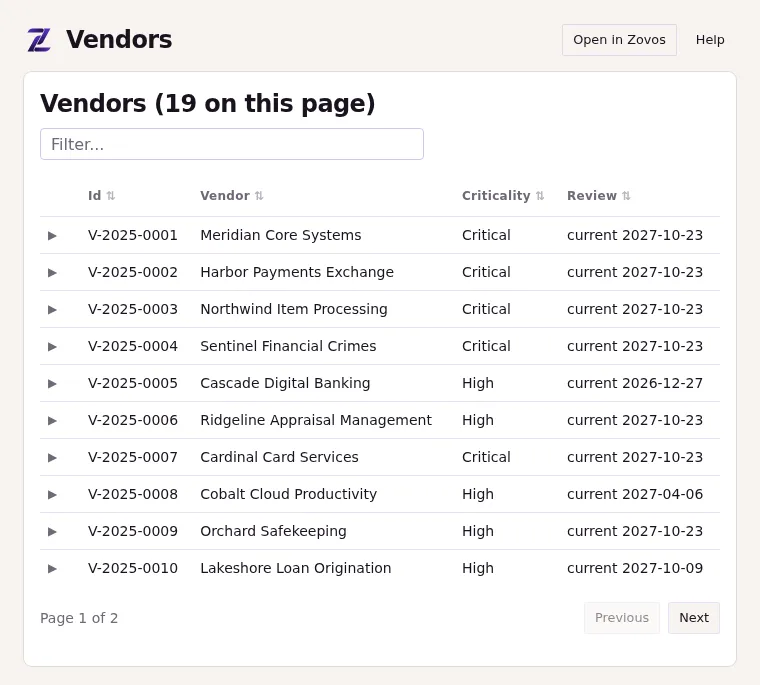
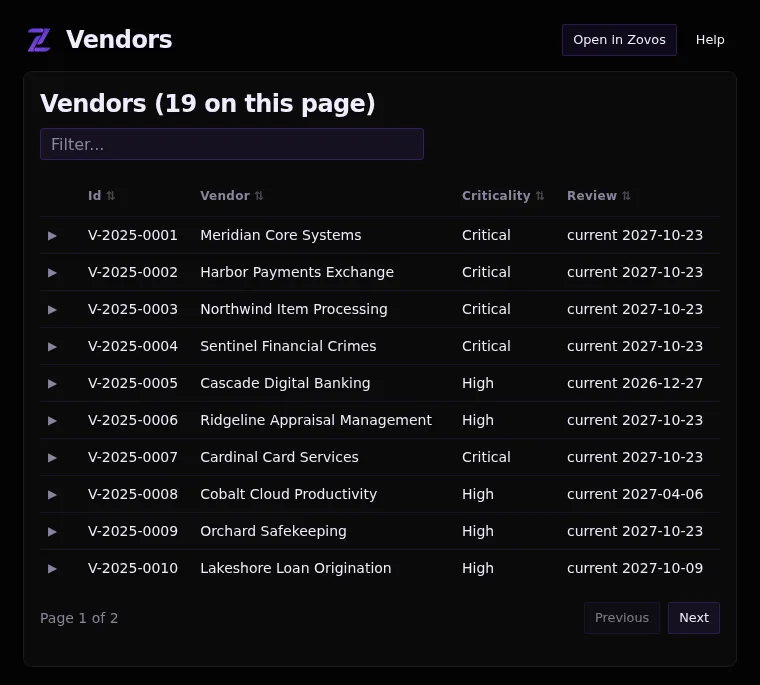
In an AI assistant that shows Zovos screens in the chat, such as Claude, ask about your vendors and it opens open_vendors. The screen lists the matching vendors a page at a time with their criticality and review status, and a row expands to show the rest of its details. It only reads. Use Open in Zovos to work a vendor in the web app.
Notes and limits
This is oversight of a program, never the running of one. Zovos does not process partner transactions, and it holds no core banking or accounts-payable connector. Spend reconciliation is a spreadsheet import by design. The partner-program inventory exports as a stamped, audited register, which is a standard sponsor-bank first-day-letter line item. Vendor onboarding, partner go-live and exit all run through Approvals & delegation of authority. For the buyer-facing summary of this workflow, see third-party risk.