
Exam management & audit readiness
Exam management is the war room for a supervisory examination. Look for Exam prep, in the Exams & regulatory change group of the sidebar. The screen itself is headed Audit readiness. It holds one engagement at a time: the regulator, the cycle, the period under review, the request list, and every piece of evidence attached to it. The exam manager and the compliance team work the bank side. The examiner, once you grant access, sees a separate and much smaller room.
Set up the engagement
Start with New engagement. You record the regulator, a title, the frameworks in scope, the cycle, the period start and end, and the examiner of record. Picking a request-list template for that regulator instantiates a pre-mapped request list in one step, so you are not retyping a first-day letter from scratch. Request-list catalogs cover safety and soundness, BSA/AML, CRA and trust examinations, and a state examination type comes from the state regulator profile for each state in your footprint.
The hero shows readiness as a share of requests complete, plus evidence coverage by control area. Readiness is computed from real request and evidence completeness. An empty engagement honestly reads as zero rather than as a comfortable default.
Below the engagement sits Next expected examinations. It has one row per examination type: safety and soundness, IT, BSA/AML, consumer compliance, trust and other. Each row shows the regulator, the date and rating of the last examination, the next expected date, and the preparation window before it. An examination that does not apply to your charter stays on the list with its applicability switched off, rather than disappearing and being forgotten. Those expected dates feed the obligations calendar, so preparation starts on a schedule instead of on a phone call.
Exam ratings are stored with their history for each examination, including the composite and component CAMELS ratings and your own CAMELS self-rating. CAMELS ratings are visible only to the board and executives, because they are confidential supervisory information.
Maximum examination interval
Beside it, Zovos derives the longest your agency may go between full-scope safety and soundness examinations under your charter's rule. For a bank that is 12 or 18 months under 12 U.S.C. 1820(d) and the agencies' September 2026 interim final rule, where the 18-month cycle reaches institutions under $6 billion that meet every condition. For a credit union it is the scheduling policy in NCUA Letter to Credit Unions 25-CU-03. The well-capitalized condition reads your latest recorded capital position. The panel lists each condition with whether it holds and the recorded datum behind it. A condition Zovos holds no datum for reads Not recorded and is never counted as met, so the panel reads "cannot be confirmed" when the answer depends on it. It shows the latest date each possible interval allows and flags an expected date you entered that falls after the maximum. The result is a suggestion only. The agency sets the examination date, and nothing in the panel is saved or pre-filled.
Conditions Zovos keeps no register for, such as your capital category, a change in control or a change of chief executive, are confirmed with Affirm by a named member, with the date and an optional note. "No formal enforcement action in force" needs an affirmation too, and it fails whatever was affirmed while an action in force sits in your supervisory-actions register. An affirmation made before your last examination reads Not recorded again until it is renewed, except the charter and charter date, which stand until they change.
The first-day letter
Upload the first-day letter, which is also called the document request list or the PBC list. Then choose Parse letter in the exam-room panel. Zovos segments the letter into individual request lines using structural parsing, then classifies each line against the catalog for the engagement's examination type, and for a CRA examination against the catalog for your CRA exam profile. You confirm or override every classification, or mark it as no match. The classification is a suggestion, never an auto-commit.
A confirmed classification maps artifacts for you: the catalog's citations resolve to your controls, with test-evidence freshness attached, and to your policies through the crosswalk. Those proposed links land for an analyst to accept or dismiss. The exam-room panel shows the coverage bar across covered, partial, gaps and to-review, with the ranked gaps listed first.
Work the request list
Each request has an owner, a due date, and a status that moves from not started to in progress to submitted, and then to accepted or returned by the examiner. Every status move on the bank side takes a written rationale, so the request history reads as a record of decisions rather than a trail of clicks. You produce evidence three ways: Upload file, Attach note, or Reference a document already in the library. A request can also cite a record Zovos already sealed, such as final board minutes, a board pack, an issued internal audit report, a sealed credit review report or the approved credit review plan, and the exam package labels each cited item by its real kind. A first-line manager sees the requests assigned to them in My work and in an Exam requests view, and answers them there. Accepting or returning a request always applies the proof ledger and the separation-of-duties block. Once at least one examiner-originated follow-up exists, a filter appears to narrow the list to those items. If you connect an AI assistant, its ready-made Prepare an exam request list prompt walks the open requests with you. See Connect your AI assistant.
When you are ready, Generate exam binder assembles the package. The binder carries a content hash and its generation is sealed into the proof ledger, and past binders stay downloadable with their hash. That way "which version did we hand over in March" has an answer.
Close out the examination
Once an engagement reaches reporting, an Exam close-out panel tracks what the examination produced. It lists the steps still outstanding, in the product's words: file the report of examination, take the ROE to the board, take the examiner findings into the register, draft the response letter, issue the response letter, and promote the MRAs to a supervisory action. The last step appears only when the examination produced MRAs or MRIAs to promote.
You upload the report of examination to Documents and then file it here, and filing it is what starts the response clock. The board review points at the board meeting where the report was taken. Findings intake opens the examiner's findings in the shared register with their source, severity, owner and due date, and marks a finding that repeats an earlier one. Each examiner finding carries the issuing agency's own finding type, such as an MRA or MRIA, an MRBA, a DOR or a supervisory recommendation, and the close-out has an owner picked from your members. On each examiner finding you then record its supervisory basis, unsafe or unsound practice or violation of law with the law cited, and the date the communication was issued. An MRA or MRIA issued on or after November 2, 2026 must name its basis. The response letter is drafted in the document editor, issued with the date it was sent, and downloadable as a sealed letter. The Report of Examination response due date stays on the calendar until the response is sent. When the examiner later confirms that a finding is closed, you record that confirmation separately from your internal closure, so the register shows both. Promoting MRAs turns the findings you name into a formal MRA set, one article per finding, which you then work in Supervisory actions. The panel reads closed out once every step is done. Close-out is the institution's own deliberation, so examiner sessions do not see it.
The correspondence log keeps regulator meetings, letters and inquiries inside and outside an examination, with structured attendees, so a conversation with your examiner between cycles is a record too.
That chain is readable rather than merely asserted. A proof ledger panel on this screen lists the sealed events in order, with who sealed each one and when, and you can filter it down to a single record. Beside the events it lists the external anchoring runs. The runs that failed are included, because a gap you cannot see is not evidence of anything.
What the examiner sees
Examiner access is granted by an owner, scoped and time-boxed. You choose the scope and a duration. The scope covers frameworks, specific finding IDs, a date range and the regulator. The examiner signs in and sees a persistent banner with the scope label and a countdown to expiry. The grant screen shows the token once and tells you plainly whether it was delivered to the examiner or whether you need to hand it over yourself. Zovos sends no email today, so expect the second case. You pass the one-time token to the examiner, and they paste it on the sign-in page.
The examiner does not see the war room. Exam prep opens for them as the Exam room, which shows their request list grouped by regulator module. Each item carries its status, the shareable evidence attached to it, and a comment thread. They can Accept a submitted item or Return it, and both take a required rationale. They can also Request a follow-up to add a new item to the list, without anyone emailing a zip file. The room also carries an internal-audit coverage card showing the issued audit plan, the issued reports, and the quality-assurance position. That card is what an examiner reads when deciding how far to rely on your internal audit function. A Changed since panel shows what moved in your program since the last examination on file. It is reconstructed from the sealed ledger, says which parts are exact and which are approximated, and lists what it leaves out.
An outside CPA, a credit union's Supervisory Committee audit firm or an independent AML/CFT tester gets the same kind of session on the External auditor lane. It lasts until an engagement end date the grantor sets, up to 90 days, and its banner shows that date. An examiner whose grant names model risk can also read the governance pack for the Zovos AI agents.
The session is revocable, its grant and revocation are audit-logged, and it can be pinned to an IP range. It is read-only at the database with a closed set of exceptions. Those are the follow-up, the accept-or-return and the comment described above, plus uploading a document into the room. They are the only writes an examiner principal can make anywhere in Zovos. Rows marked internal are hidden throughout. In the findings register an examiner reads only the findings their grant covers, and the counts at the top of the register are computed over those same rows, so the header and the list always agree. Whole areas are denied to examiners as work product: board governance and minutes, the decision register, and the mock exam. Examiner-sourced findings carry a required regulator attribution, so one regulator's confidential supervisory information never reaches another regulator's room.
Mock exams and the as-of view
The Mock examiner panel is the adversarial self-test. Pick a published examiner workprogram and run it against your live records. Procedures return pass, fail, not applicable or not evaluated. An empty population honestly returns not applicable rather than a pass. Failed procedures produce draft findings in examiner voice at a severity of MRA, recommendation or observation, and each one has to be explicitly promoted before it becomes a finding in the register. Mock exams are internal only. Examiner principals are denied on every route behind them.
The Program as of a date panel reconstructs your program as it stood on a past date and exports a proof pack a third party can verify offline. It is candid about how it knows each part. The policies in force and the attestations that existed are reconstructed exactly, while the risk acceptances that were live are labelled as approximated. The panel says so on screen rather than presenting all three with equal confidence. The Board pack lineage panel does the same job for a sealed board pack, re-verifying each claim as unchanged, drifted, or an unknown query.
The request list in your AI assistant
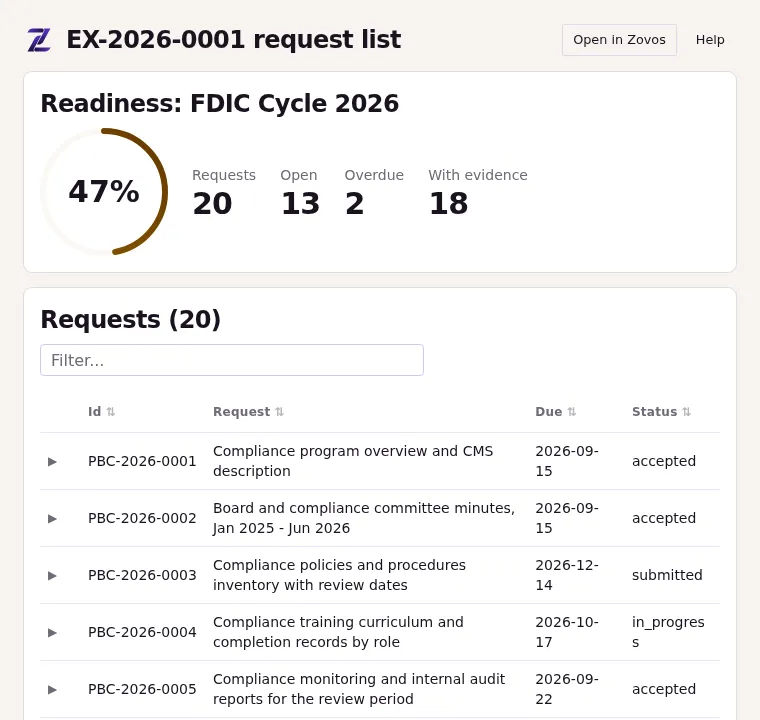
In an AI assistant that shows Zovos screens in the chat, such as Claude, ask about an examination's requests and it opens open_exam_request_list for that engagement. A readiness ring shows how far along the list is, beside the number of requests, the open and overdue ones, and the ones with evidence. The request list follows, a page at a time, and you can drill from a row into the request. From the request your staff can attach evidence, comment and submit, and answer an examiner's evidence request, each after the assistant shows what it would do and you confirm. A request's owner can upload its evidence the same way. Writes are refused once the engagement is closed. The ready-made prompt for preparing an exam request list, described in Connect your AI assistant, works from the same list.
Notes and limits
A closed engagement refuses new child records, such as requests, evidence or proposed requests. Exam readiness is per engagement. There is no single always-on institution-wide readiness score independent of an open engagement. Binder exports are hash-stamped and ledger-sealed but not watermarked. Watermarking applies to external document-room delivery. An examiner in scope also reads your formal supervisory actions, filtered to their own agency's lane. See Supervisory actions & the advisory log. Findings raised during an exam flow into the shared register described in Findings & remediation, and access scoping is covered in Roles & permissions.