
Risk management
Risk management in Zovos is one connected set of registers rather than a folder of spreadsheets. You keep the enterprise risk register, the exceptions that waive a control, the risk and control self-assessments, the key risk indicators, the board's appetite statement, the operational loss register and the emerging-risk watch list in one place, and each of them is scored by the same engine. They sit in the Risk group of the sidebar as Risk register, Assessments, KRIs, Appetite, Exceptions, Loss events and Emerging risks, followed by the Decision register. Risk managers, the CCO and second-line approvers work here every week, and the board reads the result.
The risk register
The Risk register is the spine. Each risk carries a display ID, a category, one accountable owner and an owning business unit, a treatment, and links to the controls that mitigate it and the findings it produced. You score a risk on a 5 by 5 likelihood and impact scale, and Zovos derives the inherent band from that score. Zovos then suggests a control effectiveness from the linked controls' latest tests and the findings open against them. A person accepts or overrides that suggestion, the trail records both, and the residual band is derived from the accepted value. Neither band is ever typed by hand, so two people scoring the same way get the same answer and an examiner can see the arithmetic.
Treatments are Mitigate, Accept, Transfer, Monitor and Avoid. The heatmap plots inherent against residual so you can see where controls are actually moving the needle. Three toggles beside the register's filters open focused views. Uncovered lists active risks with no mitigating control linked at all. Awaiting confirmation lists the risks whose control effectiveness nobody has confirmed, or whose evidence has moved since someone did. Each row links to the risk, and there is no bulk confirm. Ownership shows who carries the register and which owners have not attested to what they own lately. You attest only to your own risks, and an owner who has left stays listed and excused rather than disappearing. Badges call out risks that are above appetite, overdue for review, or flagged for re-assessment.
A risk treated by Mitigate, Transfer or Avoid can carry a Treatment plan. The plan records an owner, a summary, a target date, the control health it expects to reach and the residual band it steers toward, and its actions are ordinary tasks. A Transfer plan must name its transfer instrument, such as an insurance policy, a contract clause or an indemnity. Accept and Monitor risks carry no plan. Closing a plan asks for a re-score, but it never re-scores the risk itself.
Choosing Accept on a high or critical risk is deliberately not a dropdown change. It parks the risk at pending approval and requires a bounded acceptance expiry, a linked open finding as its remediation plan, a compensating control (or a documented statement that there is none), and a written rationale. Acceptances expire rather than quietly persisting. Re-scoring an accepted risk up into the high or critical tier needs the acceptance approved again, and a retired risk or one pending approval cannot be re-scored or re-treated. A risk imported with the Accept treatment gets an acceptance record attributed to the import, and an imported re-score has the same effects as an edit.
A risk or a key risk indicator can be linked to the board-approved strategic objectives it bears on, so a risk report can be read against the plan the board set. The risk register import also carries risk velocity.
Each risk's detail also shows a bow-tie view of its causes, consequences, preventive, detective and corrective controls and the indicators that monitor it, and a What this risk has cost panel. That panel reads the loss events linked to the risk and shows their frequency and their gross, recovered and net amounts over the trailing 12, 36 and 60 months. It describes what happened and predicts nothing.
The register is built to be worked at volume. Select rows to reassign an owner, or to apply a status change with a rationale, in one step. Treatment is deliberately excluded from bulk editing, because changing how a risk is treated is a decision and not a data-entry task. You can save named views, add your institution's own custom fields, and discuss a risk in an append-only comment thread with @mentions of your team roster.
Exceptions
An Exception is a formal waiver against a policy, standard or control. It is the kind of thing that usually lives in an email thread. Each one records the compensating control, an expiry date, and an approval chain that runs from the submitter to the risk owner to a second-line approver. Tabs split the register into all, approved, pending, expiring and rejected. Approvers can request changes, reject, renew or approve.
Where the exception is bound to a risk in the register, severity is derived from that risk's residual band rather than chosen by the requester, so nobody can declare their own exception low-risk. An exception raised with no parent risk carries the severity the requester records, which is one more reason to bind it to a risk.
Assessments and key risk indicators
Risk and control self-assessments run per business unit per cycle, moving from open to in progress to submitted to attested. Members rate both design effectiveness (is the control built right) and operating effectiveness (does it actually work). Where your institution defines workshop questions, each member also answers a Question set. The RCSA program plan lays every business unit against the periods in your cycle, so a unit nobody has scheduled shows as an uncovered row with its next-due date and a badge when it falls due. Shipped assessment content packs cover a broad catalogue, including BSA/AML and OFAC, cyber, fair lending, third party, continuity, privacy, new products, UDAAP, liquidity, and per-regulation consumer packs. You can clone a curated pack and edit its item list, or author a template from scratch, and the curated packs stay read-only. A FinCEN national-priorities panel shows which priorities your assessment actually addresses.
A response can propose inherent and residual scores for a risk, and a business-line owner can propose a new risk into the cycle, which the second line accepts into the register or declines. Unit heads see their unit's assessments in a My unit band in My work and get the reminder when the RCSA plan says their unit is due.
Second-line reviewers can Raise challenge on any line. The owner responds, and the challenge is either resolved or withdrawn. An assessment cannot be signed off while a documented challenge is still open.
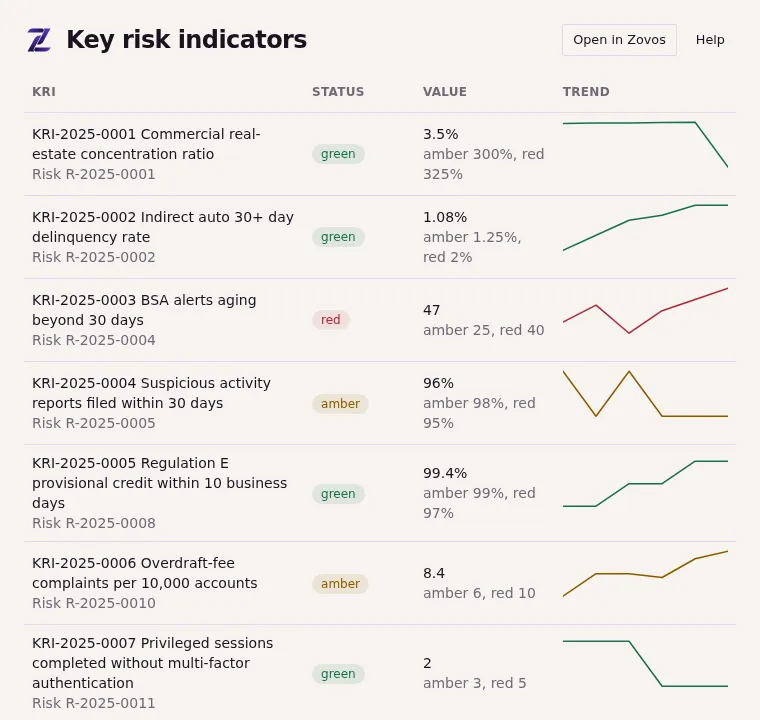
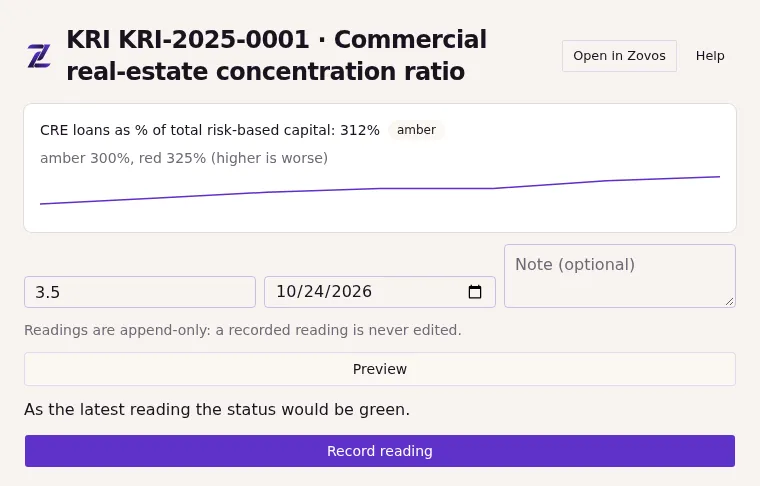
Key risk indicators carry amber and red thresholds plus a direction (higher is worse, or lower is worse), and Zovos derives the RAG status from the reading rather than asking someone to colour it in. A sparkline plots the last seven readings, so a monthly indicator's sparkline spans seven months. An indicator that has gone quiet is badged as stale rather than shown as green, and staleness follows the indicator's own cadence, so a quarterly indicator fed from call report ratios is not flagged in the second month. Readings can be fed from the loss-event register or from your institution's own call report or 5300 ratios, recorded by hand, or imported in bulk from a spreadsheet through your AI assistant, which maps the columns and previews the readings before it records them. A reading cannot carry a future date. A KRI's first-line owner sees Record reading on the KRI and records its readings, while the thresholds stay with the second line. A KRI created with a value, or an import that turns a KRI red, records the reading and raises the breach alert.
A breach never silently opens a finding. It surfaces a Flag linked risk action so an operator confirms the re-assessment. We would rather you decide than have the system decide for you.
Loss events
Loss events record operational losses, near misses and incidents, classified by the seven Basel event types and their Level 2 subtypes, with gross, recovered and net amounts and a root-cause category of people, process, systems or external. A boundary event, an operational failure whose loss is booked as credit or market risk, is marked and counted as such. A near miss has no money out and is excluded from the loss totals. The loss it avoided is recorded and reported as its own figure. Recoveries are tracked as Recovery claims, opened and then marked received. Mark as duplicate takes a second report of the same event out of the analytics and the indicators fed from them. An incident records the Regulator notification (36-hour rule) evidence: when the agency was notified, by whom, and its reference. Closure runs through Submit closure and an independent approval. Each loss records its accounting date and GL account, and the register supports a monthly attestation that the losses reconcile to the general ledger. A capture threshold you set in settings shows on the edit form, and a loss below it is flagged as below threshold in exports and in your AI assistant, which can read the loss register.
Fraud losses are loss events too. A loss classified as internal or external fraud also records the channel the fraud came through, and the Fraud losses screen in the AML/CFT & fraud group is this same register filtered to those two event types. See AML/CFT program & training oversight.
Appetite and scenarios
The Risk Appetite Statement moves from draft to pending approval to active, and is superseded rather than edited. The CRO approves it, and the board reviews it, so Zovos labels it CRO-approved and board-reviewed rather than board-approved. It sets a tolerance band per category and requires a catch-all row so no category falls outside the statement. It can also carry quantitative limits the board approves, each with a metric, a limit class, a unit, a ceiling or floor, and an optional business-unit sub-limit. Binding a limit to a key risk indicator means approval of the statement writes that indicator's amber and red thresholds. Treasury's interest rate shock, liquidity and capital limits are held here too. See Treasury & ALM. When the statement is approved, the bands are written into the enforcing configuration and the appetite fields in Governance settings become read-only. An appetite-versus-actual table shows your residual distribution, the count of risks above appetite, indicator status, and each limit as within limit or limit breached, per category.
Categories can form an optional parent and child tree. A child with no tolerance of its own inherits its nearest ancestor's band, and each row counts its own risks and those beneath it. You can adopt a shipped starter taxonomy and map categories to the Basel event types. The Basel event types against the risk register panel then flags loss experience that no risk in the register points at.
The Scenario analysis panel is scenario capture for severe-but-plausible events. A scenario is drafted, workshopped and then signed off by the board through the approvals queue, and you can adopt one from a shipped library rather than start blank. A signed scenario linked to a risk proposes a residual re-score on that risk's detail. A person accepts or overrides it, and both decisions land in the risk's score history.
Generate CRO report produces the sealed quarterly ERM committee package. It covers appetite against actual, the limit and indicator breach log, top risks and movers, acceptances, RCSA status, treatment plans, loss experience and the emerging-risk brief.
Risk culture, new activities and new products
ERM can run a risk culture survey to a list of recipients. Each recipient sees the survey in My work with a count in the navigation, gets due-soon and overdue reminders, and can answer it from an AI assistant.
New activities are assessed across payments, cards, digital banking, fintech and BaaS partnerships, and trust, and you can define your own activity types, with citations picked from the whole corpus. A new product assessment carries a rating across several risk types, a cross-functional review list, links to the vendors or partners involved, and committee approval.
A fraud risk assessment template rates fraud risk by channel and product. An insurance and fidelity bond register keeps your coverage with an annual board review, including the cyber insurance renewal questionnaire, which you can upload from the Insurance coverage screen.
Emerging risks and decisions
The Emerging risks watch list is for things you are tracking but have not formally registered. Each entry has a source type and a time horizon, and moves through watch, act, and then promoted or dismissed. Promote to register scores the entry on the same 5 by 5 model, so nothing is lost in the handoff.
The Decision register closes the Risk group. It records each risk acceptance and scoping call as its own record: the question, the decision, the rationale, who approved it, and the alternatives your team rejected. When a later decision replaces an earlier one, the supersession chain links them. See Board & governance for how the chain is recorded and read.
Risks and KRIs in your AI assistant
The risk register view
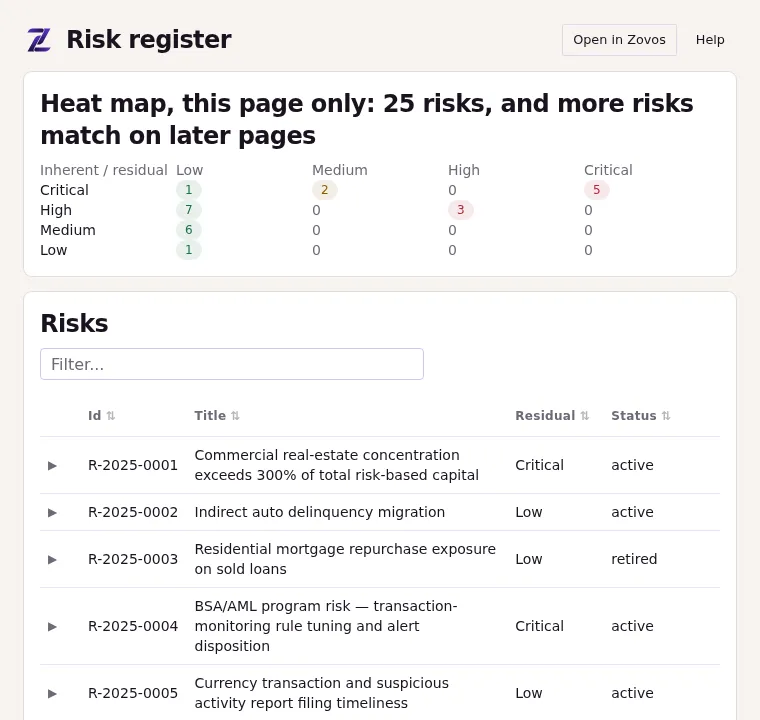
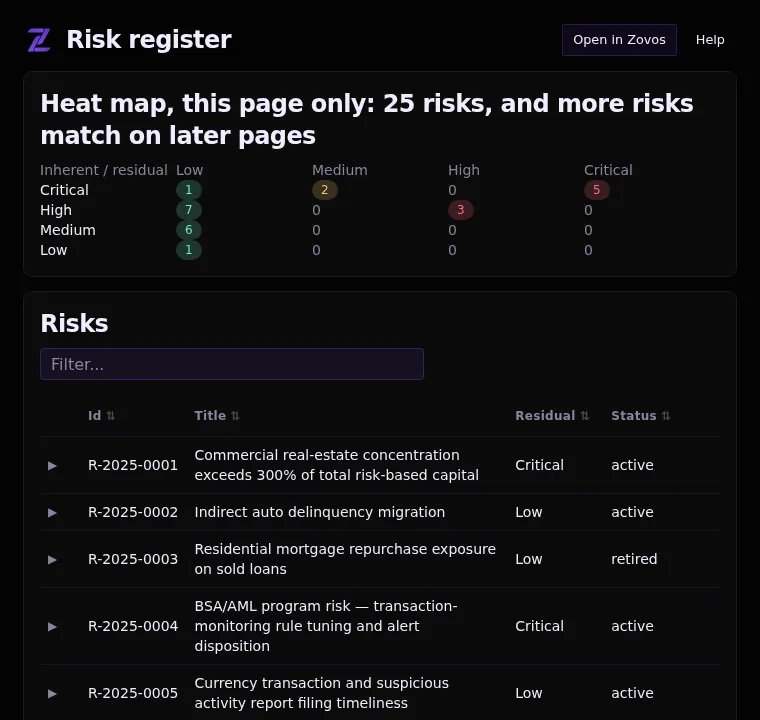
In an AI assistant that shows Zovos screens in the chat, such as Claude, ask about your risks and it opens open_risk_register. A heat map counts the risks on the page by inherent and residual band, then the rows follow. The heat map covers only the page in view, and it says so.
The KRI view
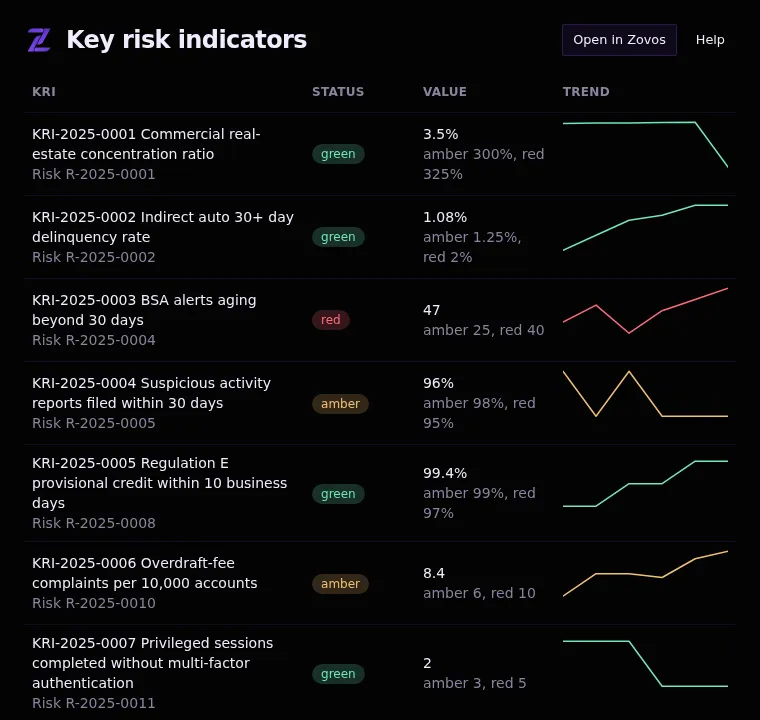
Ask about your key risk indicators and the assistant opens open_kris. Each indicator shows the risk it monitors, its status, its current value with the amber and red thresholds, and a trend line of its recent readings.
Recording a KRI reading
Ask to record a reading and the assistant opens open_kri_measurement with the indicator's current value, thresholds and trend. Enter the value, the date it applies to and an optional note. Preview tells you the status the indicator would have, and Record reading records it. A reading is append-only and is never edited afterwards. The date is a day in your workspace's timezone.
Commenting on a risk
The comment screen works for a risk as it does for a finding, with a preview of who would be notified. See Findings and remediation.
Notes and limits
Every approval described here runs through the shared queue and the delegation-of-authority matrix. See Approvals & delegation of authority. The risk register and the loss-event register both export as a stamped PDF or XLSX, and an audited Import-ready CSV streams a whole register in the exact shape the importer accepts back. Register imports take a CSV or an Excel workbook. Risk scoring is a governed judgement surface rather than a quantitative model. Zovos derives bands from what your team records and does no statistical loss modelling. Loan review has its own group and article. See Credit risk review.