
Policies & document management
Zovos treats a policy as a governed object with a lifecycle rather than a file in a folder. This article covers the whole path of drafting, approval, publication and attestation. It also covers the document library that holds everything else your program produces.
The policy register
Governing docs is the register. Each row shows the document, its tier, its version, its owner, its status, its review date, and how many citations it maps to. Tiers run policy, standard, procedure, and guideline, and the tier matters. It decides where the document routes for approval, with policies going to the board and lower tiers routing to management.
Review status reads current, due soon, or overdue, and overdue reviews surface on the Dashboard. Row actions cover attesting and retiring. An overflow menu holds edit review window, coverage, version diff, waivers, version history, attestation campaigns, and custom fields where your workspace has defined fields for policies.
A policy reads In breach when an open finding linked to it is past its remediation date. The pill names each such finding and the date it was due. Nobody sets it by hand, because it is derived from the findings linked to the policy.
Edit review window is the answer to "our review dates are wrong". It takes the effective date and the review cadence, and the next review date is recomputed from them rather than typed in. Name, version, owner and tier are not editable through that route, and there is still no delete. Retiring a policy is the end of its life, and it needs permission to approve policies.
Record board approval is a separate action for someone who can approve policies. It records the approval of a key policy, meaning the approving body and the date it approved.
The register carries the shared register tools too: saved views, spreadsheet import and the audited import-ready export described in Dashboard & daily triage.
Drafting
Authoring happens in Drafts, a collaborative editor with presence, organized in a folder tree for policies, standards, procedures, AI drafts, gap reports and exam packages. The editor has four tabs for edit, history, comments and suggestions. A citation rail keeps the obligations you are writing against next to the text.
Two things make it usable for a governance, risk, and compliance team rather than a document tool:
- Suggesting mode turns your edits into tracked changes instead of direct edits, so a reviewer sees exactly what you proposed.
- Comments can be marked internal, which hides them from any examiner session. Internal deliberation stays internal.
Exports are PDF, DOCX and redline DOCX. If your legal counsel or a board member works in Word, Send for Word review sends the draft out as a redline and pulls tracked changes back as a review-pass version. This needs your SharePoint connection in place first. Without one, the send is refused rather than half-completed. It is a checkout rather than a sync. There is one active review session per draft, an explicit conflict state if the base document moved underneath, and no silent merge. You can always cancel a review session.
Sign-off inside the editor is a native e-signature. It requires you to re-authenticate before signing, binds the signature to the document's content hash, and is blocked while unresolved suggestions remain.
Approval and publication
From a draft you either submit for approval or publish a version directly with a recorded rationale. Submitting routes the version through the approvals queue described in Approvals & delegation of authority. On approval the version becomes effective.
Version history is where the governance record lives. Each version can carry a record reference with the approving body, the board minute reference, and the meeting date. It exports as an official DOCX or PDF. If you publish approved policies to SharePoint, that happens from here too.
Every new version declares its change type, and the distinction is enforced rather than advisory:
- Material. A material change invalidates the existing sign-off and requires re-attestation.
- Editorial. The sign-off stands and no re-attestation is needed, but calling a change editorial requires a justification.
Attestation
Attestation is a named person recording that they have read and accept a document. The Attest row action is an approver sign-off, open to people whose role can approve policies, such as owner and board, and it requires a rationale. Everyone else confirms they have read a document by responding to its attestation campaign. Launch a campaign with a name, a due date and a recipient list. Launching and closing a campaign needs permission to write drafts, which the people who author policies hold, so the board approves policies but does not launch their campaigns. Each recipient still attests to their own line. The register rolls up completion as a count, exports a completion record, and closes when you close it.
A material change puts a Needs re-attestation badge on the policy until the affected people sign again. A policy that has never been signed on any version reads Never attested instead. Exceptions and waivers against a policy are handled separately, with a reason, an expiry date, compensating controls and an approving body, and they move through active, pending, expired or revoked.
The document library
Document review, opened from Documents in the My work group, is where everything else lands. That includes evidence, board memos, vendor artifacts, and procedures you have not yet brought under governance. Drag and drop PDF, DOCX, TXT and Markdown files.
The processing pipeline is visible, and it fails closed. A file uploads, is quarantined pending a virus scan, then indexes for retrieval, and only clean, scanned versions are ever indexed. A file that fails the scan is blocked and reported as blocked. Re-uploading a document you already hold is handled explicitly as a New version of that record, rather than as a second copy in the library.
The reader pane shows evidence links, version history, and mapped frameworks with a match percentage. It also carries records disposition: a retention class and a status of within retention, due for disposition, on legal hold, or disposed. When a record reaches the end of its retention, it queues a record disposition review with an outcome of retain or clear for disposal. The review itself destroys nothing. It records a human decision, and disposal remains a separate, deliberate act. A clearance for disposal takes effect only once a second member who holds records approval approves it with Approve clearance, or under the sole-operator override when nobody else holds that approval.
A legal hold is more than a status on a document. Open the hold and you see what it actually preserves. That is the documents scoped under it, which you add to and remove while the hold is active, and afterwards its release record. A hold cannot be edited or deleted. Release is its auditable end, and the scope of a released hold stands as the historical record of what was preserved. Releasing a hold takes two people. One member requests the release with a reason, and a different member who holds records approval releases it. Where nobody else holds records approval, the requester can approve their own request under the audited sole-operator override described in Approvals & delegation of authority. Retention classes themselves are editable and removable, although the platform refuses to remove one that is still in use or is your default.
Policies in your AI assistant
Upload policy documents
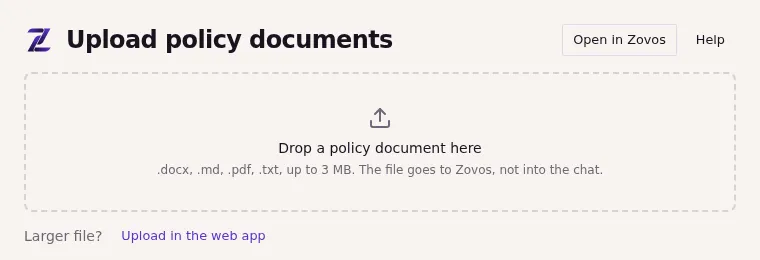
In an AI assistant that shows Zovos screens in the chat, such as Claude, ask to upload a policy document and it opens a drop zone with upload_policy_document. Drop a .pdf, .docx, .txt or .md file of up to 3 MB and choose Upload to Zovos. The file goes to Zovos and not into the chat. It lands in the document library, where it is scanned and indexed like any upload, and the screen lists each file with its scan and index status. For a larger file, choose Upload in the web app.
Attestations you owe
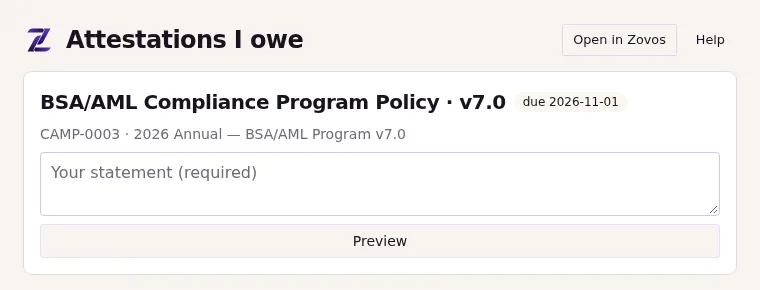
Ask to see your attestations and the assistant opens open_attestations. It shows every policy attestation and control certification waiting on you, each with its form. Write your statement, choose Preview, then confirm. A certification can carry an exception, and the exception can also open a finding. The preview names that finding, with its title, severity and owner, before it exists. An attestation cannot be changed once it is made.
Proposals, templates and retired policies
A procedure's owning manager can propose a revision into compliance's draft queue, from the web app or from an AI assistant, and the proposer cannot sign off their own proposal. An edited draft drops its approval, draft sign-off follows separation of duties, and Signed off shows the state the server recorded. Only a policy, standard or procedure draft can be released into a policy, while other drafts stay their own governed documents. A policy's detail shows a source chip with who wrote it and when.
The template library adds an AI governance policy and a generative AI acceptable use standard, and templates for the interest rate risk, liquidity and contingency funding, investment and capital policies and the ALCO charter. A retired policy stops publishing, re-opening attestations and launching campaigns, and a retired policy section no longer feeds questionnaire answers or exports. The board secretary sees the policies the board approves on the required annual items panel and can tag one on an agenda line.
Notes and limits
Zovos is not your document management system of record. It ingests from SharePoint, Google Drive and Box, and it publishes approved policy versions back out to SharePoint. Apart from that publish step the connectors are one-way ingest, and the Word round-trip is explicitly a review cycle rather than continuous sync.
Drafting agents produce proposals. A drafted policy carries a banner saying so, and it is never published without a person approving it.