
Connect your AI assistant
By Adam Swenson · 15 September 2026
You can connect the AI assistant you already use to your Zovos workspace. That includes Claude, ChatGPT, Cursor, Microsoft Copilot and Gemini. Once connected, it can answer questions from these docs and the API. It can show you your own work and your approvals queue, and it can find a record by its ID or title. It can read your controls, risks, findings, key risk indicators, vendors, obligations, regulatory updates, exam request lists, policies and evidence requests to help you draft. It can create a task or comment on a finding or a risk. It can bring data over from a spreadsheet or a previous tool, and it can submit a control test on your behalf. In an assistant that shows Zovos screens in the chat, such as Claude, it can also walk you through setup, from inviting your team and editing roles to enrolling frameworks and setting governance policies, and it can open your approvals inbox so you decide an item yourself. The assistant works as you. It acts only within your Zovos role, only in your own workspace, and only after a tenant admin has turned the connector on.
There are things it never does. It never sees another customer's data. It never approves or signs anything. It never changes the four safety switches, which turn AI processing, the connector itself and assistant control testing on or off and set the longest examiner session. It never connects Slack or sets up single sign-on. Those stay in the web app. It cannot reach fraud cases or SAR decisions. An examiner session cannot read or change any workspace data over the connector. When you decide an approval on the Zovos screen in the chat, you press the button yourself, and the decision is yours. A control test it submits waits for a reviewer other than you before any rating changes. A change to a record or a setting shows a preview or a dry run before anything is written. Zovos never receives your assistant vendor's credentials or your system logins. Zovos only answers the authenticated requests your assistant makes with your Zovos sign-in.
Before you connect
- A tenant admin turns the connector on. In Settings → Integrations → AI assistants, an owner enables Remote MCP server, which every tool requires, reads included. To let assistants submit control tests, the owner also enables ZEP control testing. Both default to off, and nothing is reachable over the connector until an owner opts in.
- Sign in with your organization selected. Adding the connector runs the Zovos sign-in, with a password and an authenticator app or your institution's single sign-on, under the same rules as the web app. You must pick your organization at sign-in. A session with no organization is refused with a message telling you to choose one. Zovos never defaults you into an organization.
- Your email must be verified. A sign-in whose email is not verified is refused.
- Your Zovos role governs what the assistant can do. It is the same role-based access as the web app. A WorkOS admin or owner maps to the Zovos owner role, and everyone else keeps their existing Zovos role (analyst, internal audit, board, risk approver, or a custom role). Every tool that reads or changes workspace data, and both ready-made prompts, refuses an examiner session. An examiner can only confirm who they are signed in as and search these public docs. If your access comes through a scope-limited access group, the assistant can show you your own work and find the records in your scope by ID or title. The other read tools need the permission held without a scope. There is no separate connector permission to grant. Provision the person's role in Administration → Team and the assistant inherits it.
The endpoint
Point your client at the Zovos MCP endpoint and complete the Zovos sign-in when prompted:
https://app.zovos.ai/api/mcpEvery client uses the same URL and the same OAuth 2.1 sign-in (WorkOS AuthKit). Major assistants register themselves automatically, so there is nothing to pre-configure on Zovos's side. Your workspace (tenant) is derived from your verified sign-in, never from the URL, so there is one URL for everyone.
Set up your client
Claude Code (CLI)
claude mcp add --transport http zovos https://app.zovos.ai/api/mcpClaude Code opens the sign-in in your browser on first use. It has a local shell, so it can both run a control test and submit it.
Claude.ai and Claude Desktop
Go to Settings → Connectors → Add custom connector, paste https://app.zovos.ai/api/mcp, and complete the sign-in. Claude shows the Zovos screens described below in the chat. These clients have no local shell, so for control testing they are submit-only. Pair them with the local bridge below to attach evidence files.
ChatGPT
- Deep research connectors use two read-only tools named
searchandfetch. Zovos's docs Q&A pair provides them, so deep research can search and cite these published docs. - Developer mode (Settings → Connectors → Advanced) exposes the full tool set, including writes, over the same URL. Use it for reading your GRC data, migrations, and ZEP submissions. With no local shell it is submit-only for control tests. Pair it with the local bridge for artifacts.
Cursor
Go to Settings → MCP → Add server, choose type HTTP, and enter the URL https://app.zovos.ai/api/mcp. Cursor completes the sign-in in-app. It has a local shell, so it can run and submit a test.
VS Code / GitHub Copilot (agent mode)
Add the server to .vscode/mcp.json:
{ "servers": { "zovos": { "type": "http", "url": "https://app.zovos.ai/api/mcp" } } }Copilot agent has a local shell, so it can run and submit a test.
Copilot Studio
Add a custom MCP connector pointing at https://app.zovos.ai/api/mcp with OAuth 2.1 against your WorkOS sign-in. Studio agents run server-side with no user shell, so they are submit-only for control tests.
Gemini CLI
Add the server under mcpServers in settings.json:
{ "mcpServers": { "zovos": { "httpUrl": "https://app.zovos.ai/api/mcp" } } }It has a local shell, so it can run and submit a test.
Local bridge (npx zovos-mcp)
Some clients cannot run a test themselves, such as Claude Desktop and ChatGPT, and sometimes a client's own OAuth misbehaves. In those cases, use the zovos-mcp bridge. It runs on your machine, signs you in, and adds the evidence-upload helper the raw connector cannot provide.
npx zovos-mcp loginauthorizes the CLI with your Zovos sign-in.npx zovos-mcpstarts the bridge. Point your assistant at the commandnpx -y zovos-mcp.npx zovos-mcp doctorchecks reachability, your token, and the workspace flags.
The bridge exposes four of the connector's tools. They tell the assistant who you are signed in as, read your controls, submit a control test result and check a submission's status. The bridge never confirms a write on your behalf.
Availability. The zovos-mcp package publishes to npm when Zovos announces the connector. The commands above are how they will read once it is published.Screens in the chat
In Claude, and in other assistants that support MCP Apps, many tools open an interactive Zovos screen inside the conversation instead of answering in text. There are screens for the setup checklist, the import wizard, team setup, the role editor, frameworks, business units, policy uploads, governance settings, connectors and the approvals inbox. There are read screens for your own work and the main registers, and screens for the daily writes, such as attestations, KRI readings, tasks and comments. Each screen is described on the docs page its Help button opens.
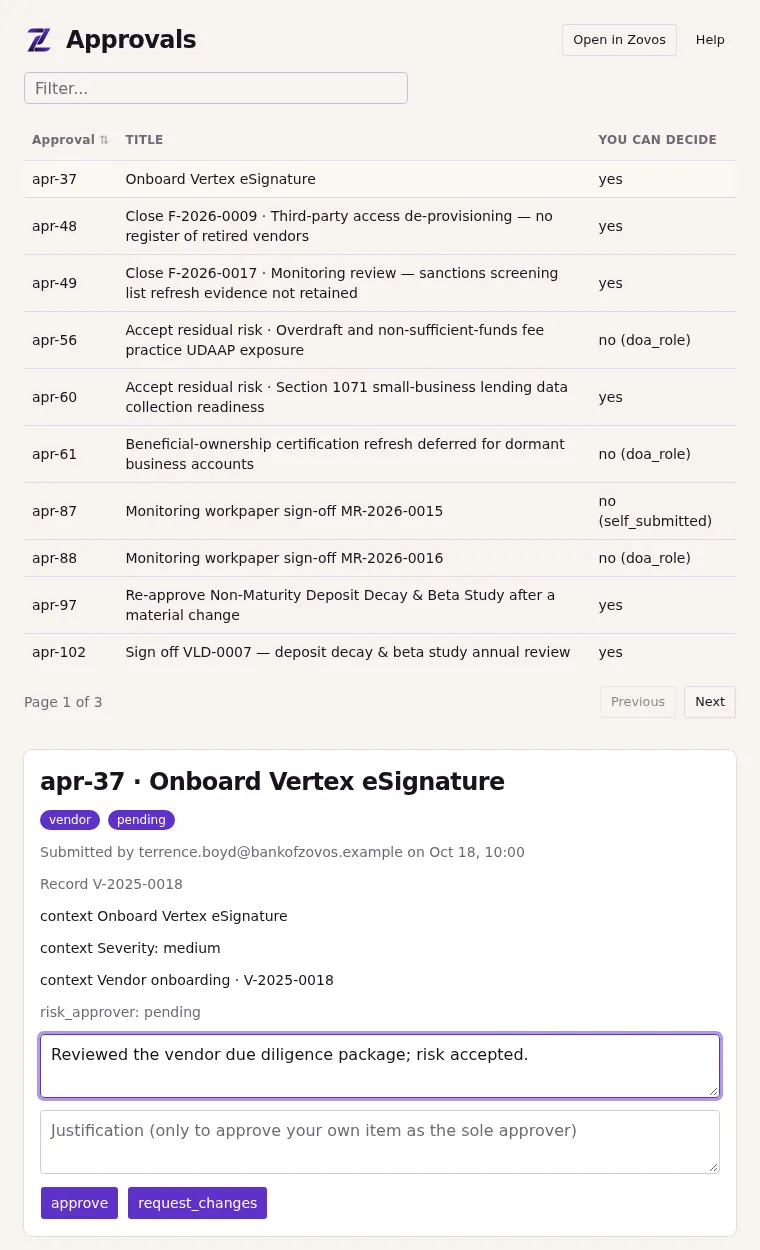
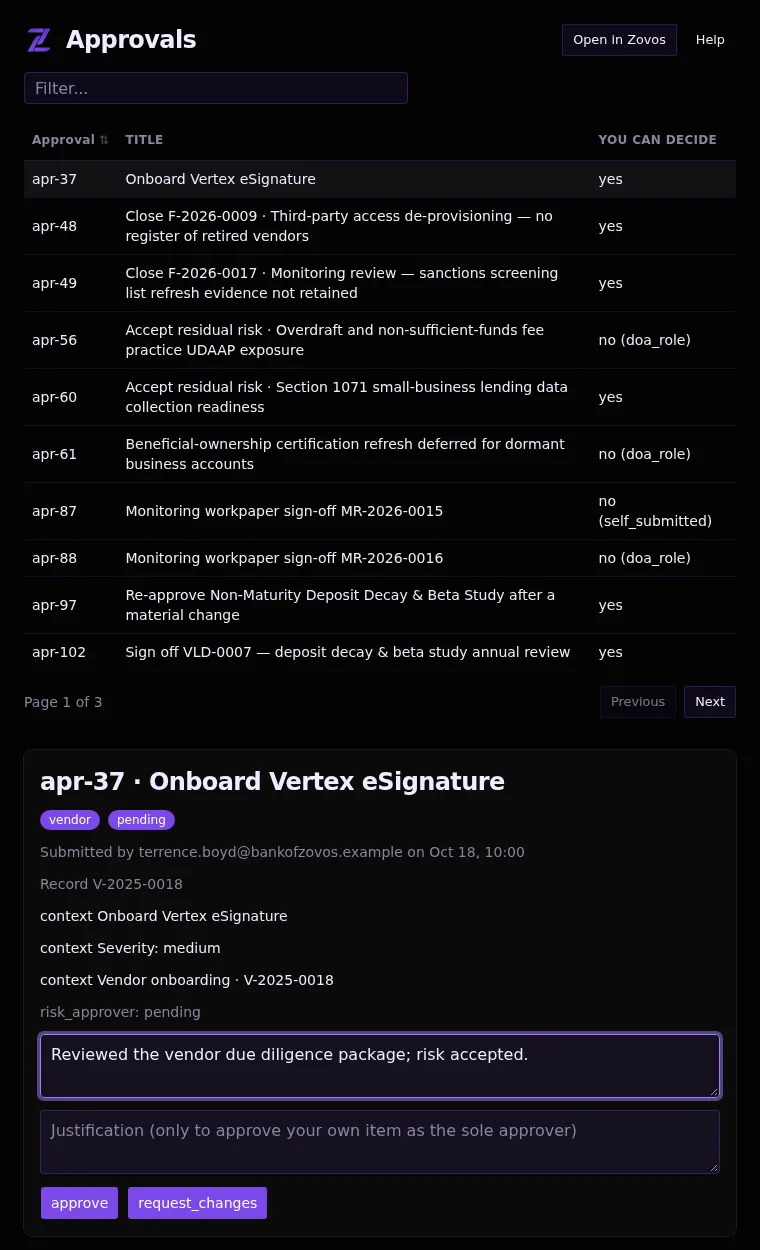
- Every screen carries the Zovos header. Open in Zovos opens the same place in the web app, and Help opens the matching page of these docs.
- It follows your assistant's theme. A screen is light or dark to match the assistant, and it switches when you change the assistant's appearance.
- Changes are previewed, then confirmed. A button that changes something shows a preview first. While a call runs, the screen's buttons are greyed out and a bar shows that the work is in progress.
- The assistant hears the outcome. When a screen finishes something, such as an import, a decision or an invitation, it posts a short line into the chat with the record IDs and counts, so the assistant can carry on from there. The line never carries a file's contents.
- Files go to Zovos, not to the chat. A file you drop on a screen, up to 3 MB, is sent to Zovos and never enters the conversation or the assistant's context. A larger file goes through the web app.
- A screen is not a permission. It runs under your Zovos role, exactly as the tool behind it does, so a button can only do what you could do in the web app.
Clients that do not show screens
A client without MCP Apps support gets the same result as text. Every screen also returns a text version that lists what it shows, with the record IDs and the tool to call next, so the assistant can do the same work in words. A change still goes through a preview first, then a confirmation. For files, use the upload and import screens in the web app rather than pasting rows or document text into the chat.
Who you are signed in as
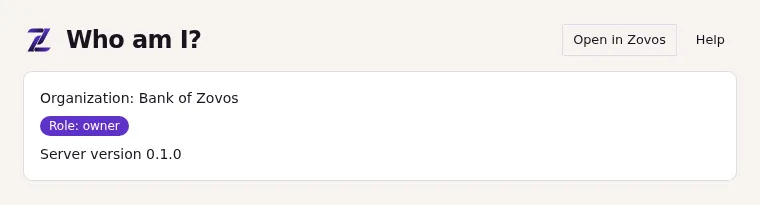
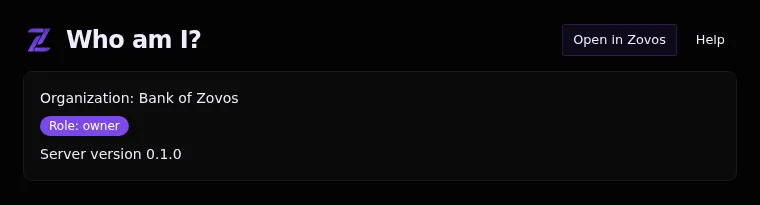
Ask your assistant who you are signed in as. It shows a card with your organization, your Zovos role and the server version with open_whoami, or the same facts as text. Use it to check that you chose the right organization at sign-in.
What the assistant can do
Everything runs under your Zovos role, and every tool result is labelled as data for the assistant to read, never as instructions to obey. A tool reads only the registers your role can read, and the reads return a page or a capped list that says when there is more than it returned.
- Answer questions about the docs and the API. These customer docs are searchable without signing in. The API reference is searchable once you are signed in.
- Tell you what is on your plate. It can list your open tasks, the attestations and certifications waiting on you, and the vendors, risks, key risk indicators, self-assessments and exceptions you own. It can show your approvals queue and whether you can decide each item, and, in an assistant that shows Zovos screens, open the approvals inbox so you can decide an item yourself, with your rationale, under the same checks as the approvals drawer in Zovos.
- Find and read your records. It can find a record by its ID, legacy ID or title. It can read your findings with their corrective action plans, your key risk indicators with their status and recent readings, and your vendors with their reviews and the reports and contracts coming up for renewal. It can also read the regulatory updates your institution follows, an examination's request list and how ready it is, and cited excerpts from your current policies. Internal notes on a finding, comment text and vendor contact details are never returned, and policy search is off while AI processing is turned off for your workspace.
- Read your GRC data for drafting and evidence work. It can read your controls, your risk register, your obligations, the impact of a regulatory change, and the evidence a request needs, so it can help you draft.
- Create a task or comment on a record. It can create a task for a named owner, optionally tied to the record it comes from, and post a comment on a finding or a risk that notifies the people it mentions. Both show a dry run first.
- Draft answers to due-diligence questionnaires. Answers are grounded in your own prior answers and come back as a draft for you to review.
- Bring data over from spreadsheets or a previous tool. It maps your columns to a Zovos register (risks, vendors, controls, policies, findings, the model inventory, the AI register, key risk indicator readings and more), shows a dry run first, imports on your confirmation, and can roll back an import if it went wrong. The import screen shows what each field accepts, such as a blank cell keeping the current value, lists the hand-entered rows a re-import would replace, and keeps the uploaded file's name on the import.
- Set up your workspace. It can show the setup checklist, invite teammates and change their roles, access groups and job families, edit custom roles, enroll frameworks, add business units, upload policy documents, run gap mapping, change the governance policies and work through the Microsoft connectors. Each takes the same permission as the matching web screen.
- Bring up the daily writes. It can open the screens where you make a policy attestation or control certification you owe and acknowledge a finding addressed to you, and it can record a key risk indicator reading after a preview.
- Work examination and audit requests. Your staff can open an examination's request list, drill into a request, attach evidence already in Zovos, comment and submit it, and a request's owner can upload its evidence. Internal audit auditees can answer their requests, including with access through a scoped group. Internal audit can distribute an issued report and revoke a recipient, and recipients can read the reports distributed to them.
- Search and update more registers. It can search the cybersecurity and business continuity registers, answer a BIA, update a plan's contacts and review a plan. It can read the loss register, your AI systems and model inventory, and the credit review exceptions on your plate. It can answer a risk culture survey addressed to you, edit a state in your institution's jurisdiction footprint, and set the model risk lead in the governance settings.
- Help the board secretary. The board secretary can list and read meetings, see the board book's published versions, add and reorder agenda items, and start the minutes as a draft filled in from the meeting's record.
- Work what you own. As an owner it can propose a revision to a procedure you own into compliance's draft queue and stage and file a self-test of a control you own, including by dropping the evidence onto a Zovos screen. A delegate covering for an owner gets the same checks as in the web app, and every action and upload is recorded as acting for the owner.
- Submit a control test. It submits a test you ran with the assistant's own tools, with the raw evidence, over the Zovos Evidence Protocol. See Test controls with your own AI assistant.
Two ready-made prompts
Zovos also offers two prompts that you start yourself from your client's prompt menu. A prompt is a fixed set of instructions that has the assistant gather information with the tools above, in a set order, and propose next steps. You decide what happens next, and any change still goes through the write tools with their own permissions and dry runs.
- Prepare an exam request list (
prepare_exam_request_list). Give it the engagement's ID as Zovos shows it. For each request that is not yet accepted, starting with the overdue ones, the assistant lists the evidence already on file, the linked controls and the gaps. It then proposes a next step for each request. - Monthly compliance summary (
monthly_compliance_summary). Give it a month written as YYYY-MM. The assistant summarizes the regulatory updates published since the month began, the overdue findings, the key risk indicators in breach and the approvals waiting on you. It closes with the three items that most need attention.
The prompts are not offered in an examiner's session. If your client has no prompt menu, you can ask for the same thing in your own words.
What happens when the assistant writes
Every tool carries a title and hints that tell your client whether it only reads or can change or remove data. Every tool that changes data is refused in an examiner's session and while Zovos has the connector in read-only mode, and every call is recorded in your workspace's audit trail. Refusals say in plain language which permission is needed, worded as the web app words them. Beyond that, the write tools work in these ways:
- Decisions and access need a confirmation only you can give. Deciding an approval, attesting, changing a role and changing your team are a governed tier. The preview returns a single-use confirmation bound to you, the tool and its exact arguments, which expires in a few minutes. On a Zovos screen you redeem it by pressing the confirm button yourself, and the model has no tool that can press it. In a client without Zovos screens, the client asks you directly. A client that can do neither refuses these writes and tells you to finish the action in the Zovos web app.
- Imports, rollbacks, tasks and comments show a dry run first.
run_importandrollback_importreturn exactly what would change and write nothing until the assistant calls them again withconfirm=true. Ask to see the dry run, read it, then say go.create_taskandadd_record_commentwork the same way. The dry run shows the task it would create and its owner, or the record a comment would go on and who it would notify. A task is created open, and a comment cannot be edited or deleted. Text that contains SAR or BSA content, credentials, or personal data such as an account or Social Security number is refused. - A control test waits for a reviewer.
submit_control_test_resultpreviews the result, then files it as pending review. A reviewer other than you accepts it in Zovos before any control's rating changes. - Setup and daily writes preview first too. Custom roles, framework enrollment, business units, gap mapping, governance policies, acknowledgements and KRI readings each return a preview with
confirm=falseand act only when called again withconfirm=true. On a Zovos screen, that is the Preview or Check button followed by the button that saves. - Uploads and saved mappings are stored when called.
begin_artifact_uploadandcommit_artifactstage and verify an evidence file,begin_upload_fileandcommit_upload_filedo the same for a file to import, andsave_mapping_templatesaves a column mapping for reuse. These have no confirm step, and none of them changes a register or a rating on its own.
The assistant can never approve, sign, or dispose of anything. Those decisions stay with a named person under separation of duties. When a Zovos screen in the chat offers a decision, such as the approvals inbox, you make it by pressing the button yourself. It runs under your role through the same maker-checker, independence and Authority Engine checks as the web app, and it is recorded under your name.
Sessions, audit, and revoking a client
Your access token is short-lived, lasting about five minutes. A well-behaved client refreshes it automatically over OAuth, so a long task does not stall. If a session fails midway asking you to sign in again, that is just a refresh.
Every tool call the connector makes is written to your workspace's append-only audit trail, recording the client, the tool, the outcome, and the signed-in person it acted for. An owner can see every connected assistant and cut one off under Settings → Integrations → AI assistants → Connected clients. The panel lists each client with the last person it acted for, its call count, when it was last seen, and whether it is revoked. Revoke stops that client's calls on their next request. A revoke can be restored later from the same panel.
Owners also hold the broader switches on the same screen. They can turn the connector off for the whole workspace, and they can set the share of accepted control tests that are randomly re-performed.
Where your data lives, and who processes it
- Which corpora need sign-in. These product docs are public and searchable without an account. Your API reference and all of your GRC data require a signed-in session and your matching Zovos permissions.
- You choose the assistant vendor. You decide which assistant to connect. Zovos answers only the authenticated requests it makes on your behalf and never sends your data to a vendor Zovos chose. Our security page and privacy policy describe what Zovos holds and how inference is handled, including that customer content is never used to train foundation models.
- Your system credentials never reach Zovos. When an assistant runs a control test, it authenticates to your systems with your credentials on your machine. Zovos receives only the result and the evidence you attach.
Troubleshooting
- The access token carries no organization. Your sign-in carried no organization. Sign in again and choose your institution.
- This organization has not enabled the Zovos MCP connector. An owner has not opted in yet. The switch is Remote MCP server in Settings → Integrations → AI assistants.
- The access token's email address is not verified. Verify your email with your identity provider, then sign in again.
- Writes are refused but reads work. The connector is in read-only mode for the whole deployment, which is a Zovos safety switch. Reads keep working. Try the write again later or ask Zovos support.
- The assistant stopped working after it was fine. An owner may have revoked that client. Reconnect, and the admin can restore it from the Connected clients panel.
- A call fails asking you to sign in again. Your five-minute token expired between steps. Let the client refresh, or reconnect.
Related
- Test controls with your own AI assistant explains how to run and submit a control test with your assistant.
- How AI works in Zovos covers the in-product agents and how humans stay in the loop.
- Connecting integrations covers the systems your documents and people already live in.
- MCP and Zovos Evidence Protocol (ZEP) Control Testing is the product overview of the connector and ZEP.
- Security · Privacy