
Connecting integrations
Zovos connects to a short list of systems that matter to a compliance program. They are your document libraries, your identity provider and directories, the channels your team reads, your SIEM, and your own tools and AI assistants. Documents come in with their source and their timestamp intact, so you are not screenshotting them by hand the week before an examination. Integrations ship disabled. Nothing is fetched from or sent to an outside system until an administrator connects it with a credential or a consent your institution controls.
How connecting works
Connections live on the Integrations tab of Settings & integrations. Tiles are grouped by the job they do. Each tile shows its direction (inbound, outbound, or two-way), how it authenticates, and your connection status. The status is one of Available, Connected, Pending, Attention needed, or Disconnected. A tile that is not connected says so plainly instead of showing a stale reading.
Connecting means providing one of a small number of things:
- OAuth or admin consent. You sign in to the provider and approve a named application against a listed set of permissions. This is how SharePoint, Google Drive, Box and the Google Workspace directory connect. The Microsoft Entra ID directory and sending from your own mailbox need no credential at all. A Microsoft administrator consents to the Zovos application once, and Exchange scopes the mailbox it may send from.
- An incoming webhook URL. You create the webhook in a Slack or Microsoft Teams channel and paste its URL once.
- An API token. The SIEM forwarder sends to your collector with a token you issue there.
- Your HTTPS endpoint. Outbound webhooks and the mass-notification linkage send signed events to an endpoint you register.
- Your identity provider. An owner connects single sign-on on the Access & SSO tab in Settings, as Sign-in and security describes, and SCIM directory sync is set up with us. Their tiles show their status.
One credential runs the other way. A tenant API key is issued by Zovos so your own systems can call us. It is covered below.
Credentials are encrypted at rest and never sent back to a browser. You can replace a secret, but you cannot read it. Every URL you supply must be https and is checked before it is stored or fetched. Creating or changing a connection is a settings-level permission and is written to the audit trail like any other governed change.
Two habits save trouble later. First, use a dedicated service account with read-only scopes instead of a person's account, so the connection does not break when that person leaves. Second, decide who owns the credential before you connect, because a connection that supplies your policy library becomes part of your examination story.
What the directory covers
| Category | What you get |
|---|---|
| Document management | Ingest policies, procedures and evidence from SharePoint, Google Drive and Box, each kept current by the provider's change feed. SharePoint also publishes approved policy versions back to a library you designate. |
| Identity and access | SAML or OIDC single sign-on and SCIM directory sync. A user access review can import its accounts from your Microsoft Entra ID or Google Workspace directory, read-only. |
| Notifications | Slack and Microsoft Teams notifications through an incoming webhook, including approval deep links, and notification email sent from one of your own Microsoft 365 shared mailboxes |
| Security operations | Forward the append-only audit log to any HTTPS collector as newline-delimited JSON |
| Business continuity | Tell your mass-notification tool when a continuity plan goes into force and when an exercise is recorded, so call trees and templates stop drifting from the plan register |
| Developer and automation | HMAC-signed outbound webhooks, tenant API keys for the REST API, and AI assistants that sign in over MCP as one of your members |
The integrations page lists every tile. Each one is available today.
Built-in features that are not integrations
Some things that move data in and out of Zovos are features of the product rather than connections to your systems. Each one is set up on the screen that uses it.
- Scheduled exports deliver datasets as a secure download link, an email attachment, or both. They are set up on the Data & retention tab of Settings.
- Board and regulator packages for OnBoard, Diligent Boards, FDICconnect and NCUA MERIT are built on the same tab. None of these portals has a write API, so Zovos builds a package with a hashed manifest and you upload it yourself.
- Public-data feeds, such as regulatory change, enforcement actions and FRED macro series, feed the screens that read them, such as Regulatory updates, the enforcement tracker and Risk appetite.
- Control content you license, such as the Secure Controls Framework, is imported from a file you supply in the content library.
Your own API access
Not every integration is a tile. Where you want to pull your own data into a warehouse, a business-intelligence refresh, or an automation tool of your own, your workspace owner can mint a tenant API key from the integrations settings.
- Scopes are chosen when the key is minted and do not change afterwards. Read scopes cover findings, the risk register and its assessments, the control catalogue, the policy register as metadata rather than document text, and the third-party register. A write scope lets a key open findings and add comments. The scope to read integration settings is required to connect an automation tool. Another scope lets it manage its own event subscriptions, which is what makes a trigger fire.
- The secret is shown exactly once, and only its hash is stored. Minting, listing and revoking are audited, and a revocation takes effect on the very next request.
- A key acts as your institution, not as a person. What it writes is stamped as a system actor. That is why no governance decision is reachable through it.
The reference for what a key can call is generated from the live routes rather than hand-written, so it cannot describe a surface that no longer exists. Ask your Zovos contact for the current copy and your developer or integrator can work from it.
Zovos has no push endpoint for key risk indicator readings. A monthly export from your core system, fraud tool or spreadsheet is imported through your AI assistant, which maps the columns and previews the readings before it records them. See Risk management.
What flows in, and what flows out
Inbound, integrations bring documents into your library, where they become searchable and citable, and directory accounts into a user access review. Everything else a compliance program records, such as remediation, control evidence, vendor ratings and approvals, is recorded in Zovos directly.
Outbound, Zovos forwards audit events, posts notifications, sends notification email, publishes approved policy versions to SharePoint, and sends signed events to your webhooks and your mass-notification tool.
Disconnecting a connection stops every feature that used it. Disconnecting Microsoft 365 removes its change subscriptions with Microsoft, and SharePoint publishing and archiving stop when the publishing connection is disconnected or its consent is withdrawn. A disconnected connection stays disconnected and offers no actions until an administrator connects it again, and a sync that finishes after the disconnect ingests nothing. Changing a webhook's URL rotates its signing key, so the new endpoint never receives a signature made with the old one.
Nothing fails silently. A notification to Slack or Teams fires only when it is configured and switched on, and a failed post is logged without breaking the change that triggered it. A scheduled export whose delivery fails is marked as an error and raises a delivery alert. The run does not report success.
What an examiner sees
Every sync keeps an append-only run log of what was pulled, when, and what came back. That record answers "when did you last actually check this", which follows every claim that a library is kept current.
A document carries its source system and the time it was collected, so a policy or a piece of evidence shows where it came from. Closure stays with a person. Governance decisions are deliberately outside the automation surface entirely. Approving a policy or accepting a closure requires a named person under separation of duties, and no automation can do it for them.
Connectors in your AI assistant
An owner can work through the Microsoft connections from an AI assistant that shows Zovos screens in the chat, such as Claude. Ask to open connectors and it opens open_connectors. The screen has a card for each of the two Microsoft apps, the Microsoft user connection and the Microsoft tenant app, with its consent status and what it can and cannot do.
- Connect opens Microsoft's admin consent page in your browser. Consent there with a Microsoft administrator account.
- Verify, once you are back in the chat, confirms the grant with Microsoft and runs a test call.
- Record site applies to the Microsoft tenant app only. It records the one SharePoint site you grant it and returns the grant command your Microsoft administrator runs.
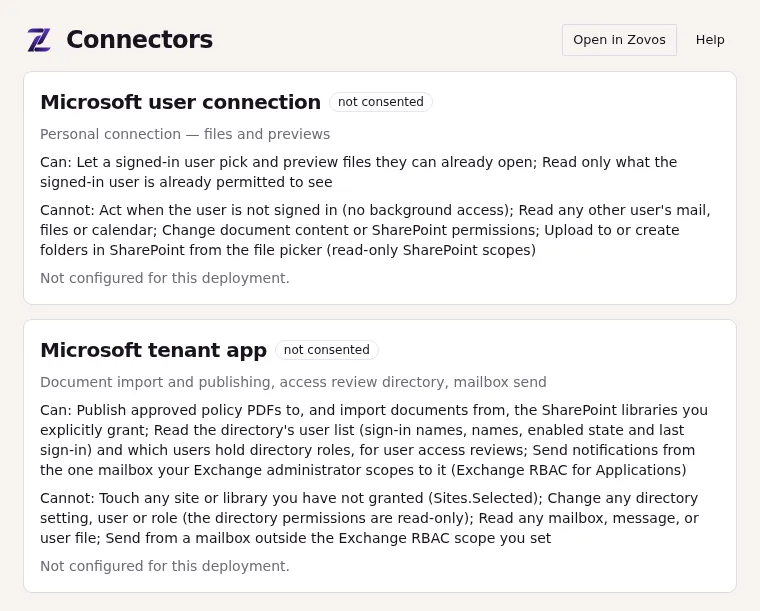
Slack and Microsoft Teams connect in the web app, with the incoming webhook URL for each channel.
Seeing the connectors takes the settings read permission, and changing them takes the permission to change settings, as on the Integrations tab.
Limits worth stating plainly
- No ticketing, security-tool, vendor-rating or e-signature integrations. Remediation, control evidence, vendor ratings and approvals are recorded in Zovos directly, and a native e-signature covers policy sign-off.
- No core banking or loan-origination connector. Leaving out Fiserv, Jack Henry, FIS and Symitar is deliberate. Zovos holds the risk and control work of every line of defense. It is not a system of record for transactions. Monitoring populations and samples arrive by import.
- No accounts-payable or ERP connector. Shadow-vendor reconciliation runs from a CSV you export.
- No two-way sync with another GRC platform. Records do not flow back and forth between Zovos and another GRC tool.
- Zovos sends no emergency alerts. The business-continuity connector keeps your mass-notification tool in step with the plan register by sending it a signed event. Zovos itself sends no SMS, voice or push messages and holds no contact roster. Emergency alerting stays with the operational tool you already use.
- A connection can need reconnecting. When a provider revokes access or refuses a token refresh, runs start failing and the tile shows Attention needed until you reconnect.