
Internal audit
Internal audit is the third line, and Zovos treats it as structurally separate rather than as another module with a different label. The audit universe, the annual plan, engagements, workpapers and issued reports live behind their own permissions, and the people internal audit audits cannot see the work in progress. The chief audit executive and the audit manager work here, and the audit committee approves the plan and receives the reports.
The independence wall
The Internal audit group is hidden entirely unless you hold internal-audit read access. It is absent rather than greyed out, the same as every other permission in Zovos.
The wall is more than a hidden menu. Internal-audit titles and rationale are redacted at the source before they can reach audit rows, notifications, chat integrations or email, so a name cannot leak through a Slack message about an approval. Proof-pack exports produced by someone without internal-audit access contain hash-only stubs for internal-audit rows, which still verify offline. The existence of internal-audit records is visible, but their content is walled.
Two consequences are worth knowing. The account with the broadest rights over the compliance program, usually the CCO, cannot see in-progress internal-audit work, because the CCO is an auditee. The internal audit role, for its part, cannot approve risk or control decisions, because those are management decisions internal audit will later audit. No role on the internal audit side can hold first- or second-line write permissions either. It reads those registers and writes only its own engagement work and findings.
The audit universe and annual plan
The audit universe is the set of auditable entities, each with its own display ID. You can import the universe, your current plan and your prior audit history from a spreadsheet when you start, and an edit to an entity records a factor confirmation only for the factors that changed. Entities are scored on five inherent-risk factors, which derive a tier and a coverage state. The coverage state measures how long it has been since the entity was last audited, relative to what its tier requires.
The risk-based annual plan is built from that universe. When you submit the plan for approval it is always routed to the audit committee, regardless of how your delegation matrix is configured elsewhere. That routing is not editable, because a management-approved audit plan is not an audit plan. Plan items follow their status rules, with an audit row on every change, a plan item cannot be completed by hand while a sibling engagement is still open, and a plan amendment can be cancelled and reinstated.
Engagements and fieldwork
An engagement moves through planning, fieldwork, review, reporting, and then issued or closed. Transitions are forward-only, and each one requires a rationale. You cannot quietly move an engagement back to planning when the fieldwork gets uncomfortable.
Each phase change also needs a supervisory phase gate, signed before the engagement can leave its current phase. Phase gates are signed on the internal audit side only. The board holds internal-audit approval authority but is not a signer for a phase gate and does not see the gate or its preview, because the preview is the work program. If the engagement is re-scoped after a gate is signed, the signature reads stale and the gate needs approving again.
The engagement is organised in tabs:
- Planning. This tab holds the append-only planning record of risks considered, objectives, scope, criteria and resources, with the phase gate and the history of every gate submitted.
- RCM. The risk and control matrix is the test plan line by line.
- Workpapers. Workpapers hold the evidence, under an enforced separation between preparer and reviewer. The person who prepared a workpaper cannot sign it off.
- Sampling. This tab plans and works the test samples.
- Draft findings. Findings are written in condition, criteria, cause, effect and recommendation form.
- Time. This tab records effort against the engagement.
- Validation. A follow-up engagement retests published findings here. A retest concluded as validated is what lets the finding be submitted for closure where your institution requires validated closure, and a failed retest leaves it open.
- Review notes. A reviewer leaves a note on one piece of fieldwork, with a thread and a resolution. An open review note blocks its workpaper's reviewed stamp, and a coaching note never does.
- Requests. This tab sends requests for information to auditees. Only a request's title and detail cross the independence wall, and internal audit's own notes on the thread stay on its side.
- AI drafts. Agent proposals appear here with their citations. Nothing becomes an engagement record until a person accepts it with a rationale, and accepted content lands as a draft that still needs its preparer and reviewer stamps.
- Confirmations. This tab tracks bank, loan and investment confirmations by hand. You send the request to the responding institution yourself, mark it sent, and record the response, which files it as an evidence workpaper on the engagement. A request you no longer need can be cancelled.
- Reliance. This tab records where you relied on another assurance provider.
- Independence. Each team member records a conflict-of-interest declaration for the engagement, and Zovos shows cooling-off flags it computes from their prior role and the engagement period alongside it. A declared cooling-off breach is enforced. A conflicted team member can stay on the engagement only with a written staffing justification, and the approvals queue flags a cooling-off conflict on a phase gate.
- Report. This tab assembles the output.
- Trail. This tab shows the engagement's own audit history.
- Team. This tab records who is staffed on the engagement, in which role, for how many hours. Once a reviewer or supervisor is named, workpaper review stamps must come from one of them.
A sample plan records the population, the method, and why that method fits the test. The population entry holds its description, its source and its size. Methods are random, judgmental, statistical, or full population. Zovos draws the selection itself from a recorded seed, so re-performing the same plan produces the same items, which is what makes a sample defensible a year later. You can supply an ordered population list. Where you do not, the drawn items open as positions in the population. A plan moves through draft, selected and concluded, and each item is worked to pass, exception or not applicable. A statistical plan states its confidence level along with its tolerable and expected deviation rates, and one sized below the minimum its own stated basis requires is refused rather than quietly accepted. Concluding writes the sample's counts back onto the risk-and-control matrix line without touching the auditor's own effectiveness conclusion.
Where a co-source firm does the fieldwork, Import co-source on Workpapers takes the firm's manifest as a spreadsheet and lands one workpaper per row, stamped with the firm, the delivery date and the firm's own reference. Sign-offs on those rows are recorded as imported rather than performed. They carry the historical date supplied and a statement of where they came from. Preparer-and-reviewer separation is still enforced row by row. The manifest does not ingest the binary evidence itself. That evidence rides the document pipeline and is linked by reference.
Independent testing of the AML/CFT program
An engagement tagged with the BSA framework counts as independent testing of the AML/CFT program, whether your own audit staff, a co-source firm or an outside tester does the work. The FFIEC BSA/AML Examination Manual expects that tester to stay out of the program being tested, including its policies and its training, so Zovos checks each person's own history rather than their role. Someone who, during the tested period, wrote, published, submitted or approved the designated AML/CFT program or customer due diligence policy, or created or edited an AML/CFT training program, cannot prepare or review that engagement's workpapers, issue its report, approve the report or sign its phase gates. The refusal names each conflicting act and its date. When the engagement has no period set, the trailing twelve months count. Board members are exempt, because the board approves the AML/CFT program and receives the tester's report. If nobody else on the internal audit side can do the work, the act can go ahead with a written justification, and the audit trail records it as a sole-operator decision under this rule, so the exception is visible to your examiner.
Reports and findings
Issue report runs under maker-checker. Every report carries a rating of satisfactory, needs improvement, or unsatisfactory. There is no fourth option and no unrated report. An issued report that published no findings says so on its face, as a clean opinion.
The report publishes the set of findings the committee approved, and once a report is issued or closed its workpapers and related records lock. Published findings keep management's agreed target date and owner, and a finding internal audit raised needs internal audit's validation to close by default.
An issued report can be distributed to a list the CAE names. The list can propose executives by their role, each recipient gets a recorded read grant, a New chip on the report clears once they open it, and a distribution can be revoked. Recipients can also read their reports from an AI assistant. The IA committee package goes on Audit Committee agendas and the board pack shelf, with past packages listed.
Once a report is issued, its findings land in the shared findings register alongside examiner matters and self-identified issues, inheriting the same owner, due date, SLA aging, root cause and corrective action plan machinery. Internal audit does not maintain a private issue list that management tracks separately. See Findings & remediation.
Reliance and the QAIP
Reliance lets you rate the work of another assurance provider and rely on it rather than re-testing the same control. That provider can be second-line monitoring and testing, an external firm, or a regulator's own work. The rating and the rationale are recorded, so the decision to rely is itself auditable.
The QAIP panel sits below the engagement list, and below the issued reports in the board's view of the screen. It tracks your quality assurance and improvement program. That means periodic internal self-assessments with a conformance rating of conforms, partially conforms, or does not conform, and the clock to your next external quality assurance review. That clock is a standing question at examination, and it is easier to answer when it is on the screen.
Credit unions
At a credit union, the screens use charter-aware labels, and the Supervisory Committee's annual audit and the member account verification have their own workflows. The Supervisory Committee audit obligation switches off when the charter changes back to a bank.
What the board sees
Directors and the audit committee get a different view of the same screens by design. They see the approved plan and issued reports. In-progress fieldwork, draft findings and unfinished workpapers stay with the audit function until the report is issued. The committee approves the plan, any mid-year amendment to the approved plan, and the report. A plan amendment is proposed, frozen as it was put, and routed back to the Audit Committee rather than applied quietly when the universe re-scores. The committee does not approve the working papers or sign engagement phase gates.
Evidence requests in your AI assistant
A member of your internal audit team can ask an AI assistant that shows Zovos screens in the chat, such as Claude, about an evidence request by its ID. The assistant opens open_evidence_request, which shows the request, its gaps, the linked controls and the evidence on file. It reads internal audit requests, so it sits behind the independence wall. A member outside internal audit cannot open it. An auditee answers the requests addressed to them from My work, or from an assistant as the next section describes.
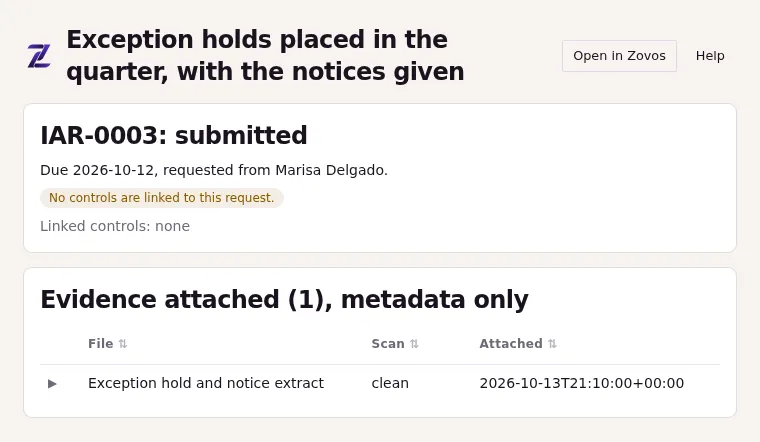
Answering an internal audit request from your AI assistant
When internal audit sends you a request for information, you can answer it from an AI assistant that shows Zovos screens in the chat, such as Claude. Ask to answer the request by its ID, such as IAR-0007, and the assistant opens open_audit_request_response. The screen shows what internal audit asked, the request's status and due date, and the files you have uploaded so far. Only the request's named auditee, or a colleague covering for them under a delegation of their work, can open it.
Nothing is written until you press a button. Upload to Zovos sends a file you drop on the screen to Zovos rather than into the chat. The file is verified and virus-scanned before it is attached to the request, the same as an upload in the web app. Post comment sends internal audit a question or a note about what you are sending. Comments cannot be edited or deleted, and Zovos refuses one that contains SAR or BSA/AML content, credentials, or personal data such as account numbers. Submit hands your answer to internal audit once the request holds at least one upload or comment from you. The request then stays with internal audit until they accept it or return it to you, and that decision is theirs alone.
You see the request and the thread you are part of. Internal audit's own notes on the request stay on their side of the independence wall. In an assistant that does not show Zovos screens, the same request comes back as text, and the assistant can post a comment or submit your answer after first showing you what it would do. Files are uploaded in the screen or in the web app, never in the chat.
Notes and limits
Zovos manages the audit process and its records. It does not perform the audit. There is no core banking connector, so a population is described or supplied by you. The drawing of the sample, the testing and the conclusion then happen here. If your institution outsources internal audit entirely, the same engagements, workpapers, sampling and reliance records support the firm's work. That firm is admitted through an access group started from the Co-source internal auditor preset rather than through the built-in internal-audit role. The preset gives a custom role on the internal audit side of the wall that reads every area and writes only engagement work, with no approval, settings or first- or second-line write permissions. An outside CPA, a Supervisory Committee audit firm or an independent AML/CFT tester takes a scoped, time-boxed and read-only grant on the External auditor lane of examiner access instead. Being on the internal audit side is what places the firm inside the wall, and the independence constraints then apply to whoever holds the role. See Roles & permissions. For the buyer-facing summary, see audit preparation.