
Frameworks & regulatory updates
The Framework library, opened from Frameworks in the Library group of the sidebar, is where you tell Zovos which regulations your institution is actually examined against. Everything downstream is scoped by what you enroll here, including coverage, gaps, agent mapping and the citation crosswalk. This article covers enrollment, the regulatory corpus behind it, and how incoming rule changes reach your desk.
Enrolling frameworks
Zovos ships with dozens of frameworks already indexed, grouped by category: consumer compliance, financial crime, prudential, cyber and technology, AI, audit and privacy, and payments. Each framework card shows a health donut, its citation count, and its open gap count.
When you enroll, Zovos recommends frameworks from your charter type and asset size, and from the SEC registrant flag in your institution profile, which also recommends SOX and the SEC cybersecurity disclosure rules. Choose Add framework to enroll one. Enrollment is the signal that you are mapped against that framework, and it puts the framework's obligations into your coverage picture. You can also set a framework out of scope, or unenroll it entirely. Out of scope is useful when a framework applies to part of your business but not the part you are assessing this cycle.
Unenrolling is deliberately non-destructive. Mapping stops and proposed gaps retire, but accepted gaps and any remediation already in flight are kept. Removing a framework should never quietly delete evidence of work you did.
For a community bank, a typical enrollment is the FFIEC IT Examination Handbook, BSA/AML, GLBA privacy and safeguards, the consumer regulations you originate under, and your prudential regulator's expectations. Credit unions swap in NCUA guidance and set the CRA program screen to not applicable, because NCUA-supervised credit unions have no federal Community Reinvestment Act requirement.
The corpus behind it
Enrollment draws on a read-only regulatory corpus that we maintain. Its citations are broken to the clause, each with its code, section, title, version and effective date. You browse it from Citations & Authorities library, where you can also register your own internal authorities. Those are your board-approved charters, committee mandates, and any supervisory correspondence you want treated as an obligation source alongside published rules.
Open any citation and its crosswalk drawer shows what it touches on your side: the controls that answer it, the policies that address it, and any open gaps against it. Each citation carries a coverage chip of covered, gap, or uncovered.
The drawer also lists Same ground in other frameworks. These are the citations in other frameworks that share an approved mapping to one of your active control objectives, so a single tested objective shows every framework it speaks to. Each row names the objective that bridges the two citations and how completely that objective covers the citation, as equal, subset, superset, intersects or related. Choose a row to open that citation in the drawer. A retired objective bridges nothing.
You can also record that a citation does not apply to your institution. Marking it not applicable to this institution requires a rationale, and the call is audited like any other scoping decision. The reason a clause is out of scope then sits on the clause itself, rather than in the memory of whoever made the call.
Internal authorities are yours to maintain. A charter, mandate or supervisory letter you registered can be corrected or removed later, along with its citable sections. The code you gave it is the stable identifier and does not change.
Each framework shows its notice and license. Licensed frameworks such as CIS, PCI DSS and ISO 27001 carry titles written in our own words rather than the publisher's text, and every crosswalked framework requirement has a corpus citation.
The corpus keeps growing. We add new citations, such as state AI laws, as they are published, and an enrolled framework picks them up without any work from you.
State rule packs and your footprint
Record your institution's jurisdiction footprint in the institution profile: the states where you hold a charter, have branches, lend, have deposit customers or employ people. A row is added by hand or imported, and changing your charter rows refreshes the profile's charter states. Your AI assistant can edit a footprint row too.
State rule packs hold one row per state and rule. From your footprint, Zovos drafts each rule's applicability to you, as applies, applies with partial preemption, or does not apply, with the preemption position for your charter, and you confirm or change it on the State requirements panel. The panel shows each rule's terms, such as a reporting duty, a hold authority, a privacy exemption or how a state forecloses, and a threshold carries the date it takes effect. A confirmed rule generates an obligation linked to its state citation. Those obligations reconcile when your footprint or a pack changes, and a confirmation made against an older version of a pack is flagged for you to confirm again. Gap mapping filters state citations to your footprint, and an obligation imported or created by hand takes its jurisdiction from its state citation.
The packs cover state bank and credit union regulator profiles with a state exam type and the state filing calendar, unclaimed property with an annual holder report for each state, elder financial exploitation reporting, holds and training, state privacy laws with biometric and consumer health data laws, state CRA, state UDAP exemptions, fair-lending protected classes, mortgage servicing and foreclosure, consumer lending and deposit laws, record retention, breach notice, money transmission and the remaining state AML rules.
The packs reach the screens that use them. A fraud case flagged as elder exploitation shows the applicable state reporting duty and hold limit, a credit union under a confirmed state CRA rule sees its CRA screens as State CRA, fair-lending checklists draw on the state protected classes and comparative file review, and retention classes map to the state record classes they cover.
Regulatory updates
The Regulatory updates screen is the incoming feed of published rules, guidance and supervisory statements, ranked by likely impact on you. Ranking uses your institution profile, which you set once in Settings. The profile records your charter type, asset band, product lines, charter states, and primary examiner.
The feed reads the Federal Register and the published releases of the OCC, FDIC, the Fed, NCUA, CFPB and FinCEN, including NCUA Letters to Credit Unions, Regulatory Alerts and the Supervisory Letters in force, with a superseded letter shown as superseded. It also reads the state bank and credit union supervisors for the states in your footprint where we have a source. Today that covers eleven states, which are Alabama, California, Georgia, Illinois, Iowa, Kansas, Missouri, Ohio, Pennsylvania, Texas and Wisconsin, with a separate credit union supervisor in Alabama, Missouri and Texas. State coverage shows each source's channel, and a state we have no source for is stated as such, so a quiet feed never reads as a quiet month.
A legislature feed watches the bills enacted in your footprint states and flags the state pack rows each one may change for review. A row an earlier review already covered is not flagged again. State coverage shows legislature coverage and the sweep status for each state, including the territories it does not cover.
You can also enter a regulatory update by hand, such as a state bulletin that reached you by email, with its attachments, and route it through the same assessment. A hand-entered update appears in your AI assistant, the dashboard, the board pack and search like any other, and the queue chip names its real source. The queue shows the published platform summary of each update, and updates already in the corpus appear before you have assessed them. Effective dates and comment deadlines appear on the obligations calendar.
Working an item follows a short lifecycle from pending, to assessed, to actioned, to closed:
- Assess applicability. Mark the item as applying to you, worth monitoring, or not applicable. If an agent drafted the assessment, you confirm or override it. The draft never stands on its own.
- Run impact analysis. This proposes the gaps the change opens and the policies and controls it touches.
- Map to policy and link affected records. Linking a policy, control, disclosure or training program raises a review task on that record, so the change actually reaches the document.
- Export the change-management log as a PDF when you are done. That log is the artifact an examiner asks for when they want to know how you knew about a rule and what you did about it.
Assessing an item, running impact analysis, linking affected records, triage and comment letters all need permission to write regulatory changes. An assessment that reaches a decision raises a routing sign-off, and that sign-off goes to a different person who holds routing approval.
The review cycle assesses only the updates that are new or changed since the last cycle, and Run cycle now offers a full re-assessment when you want one. The Regulatory Monitor runs again when an update's title changes.
Rule-change monitoring feeds the same screen. It reads rule-making feeds such as the Federal Register, the eCFR, regulations.gov and agency releases. Each item carries a band for whose rule it is: your examiner, your charter state, another federal agency, or out of scope. Items go through a short triage queue of relevant, not relevant, or confirm impact. The Watch tab shows which sources are covered and the history of each sweep.
Two more actions sit on each item. Where the eCFR shows that a part you follow was amended, Rule redline shows what changed in the rule text, section by section, with deletions struck through and insertions highlighted. The text it compares is the before-and-after snapshot stored when the change was detected. Comment letters records a public comment letter your institution filed or co-signed on a rulemaking, with the filing date, the position taken, the docket, the trade association that filed it and your rationale. A recorded letter cannot be edited or deleted, because a filed letter is a fact.
Triage is not where it ends. From an item you have decided matters, create an action plan with an owner and one task per line of work the change opens. The item then carries its plan and a progress rollup, so the queue shows how far your response has actually got rather than only that someone looked at the rule. See Tasks & action plans.
Reading your coverage
Three screens answer "are we covered?" from different angles.
The Gap report lists obligations with no adequate policy or control coverage, tabbed by all, open and breach, with statuses of compliant, review or breach. Agent-generated rows carry a proposed chip until a person reviews them. You accept, dismiss, promote to a finding, or draft a policy straight from the gap. A proposed row also shows the confidence behind it, on the same confidence bar used everywhere an AI proposal is reviewed. A gap with no evidence behind it shows no bar at all rather than a zero.
Coverage, in the Library group, has two tabs. The Coverage graph shows the whole crosswalk visually. Frameworks, citations, controls, policies, risks, findings and gaps appear as connected columns. Two badges matter here. One is uncovered, and the other is over-relied, which marks a control that so many citations depend on that it has become a single point of failure. An over-relied control is not a defect, but it is a concentration you should be able to explain.
Obligation coverage scores each obligation in each business unit from the approved mappings between your control objectives and that obligation, weighted by how effective each unit's control is. Each row reads covered, partial or gap. The scores are a snapshot, so the tab always shows when it was taken and says so when it lags your latest changes. An examiner session sees the coverage graph but not this tab.
The Proposal inbox holds the relationships the mapping engine suggests, strongest first. Nothing there counts toward coverage until a person approves it. A rejected suggestion is kept on record, and the same pair is not offered again for 180 days.
Frameworks in your AI assistant
In an AI assistant that shows Zovos screens in the chat, such as Claude, ask to see your frameworks and it opens open_frameworks with three tabs.
- Catalog lists the frameworks you can enroll. Tick the ones your institution is examined against, choose Check to preview, then Enroll. Baseline-only catalogs such as NIST SP 800-53 and the CIS Controls are never offered, as in the web app.
- Enrolled lists your enrolled frameworks with their coverage, open gaps, scope and owner, with Take out of scope or Bring into scope on each row.
- Overlap counts the controls and crosswalk pairs your enrolled frameworks share.
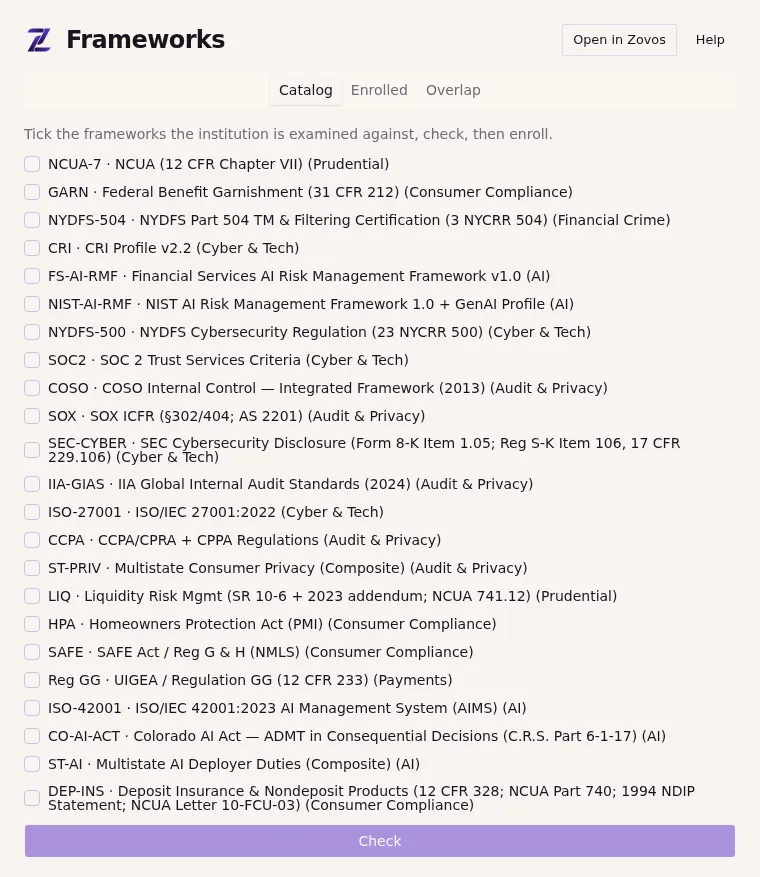
Enrolling and changing scope are owner-only, as on the Frameworks screen. Once a framework is enrolled, your assistant can run gap mapping with run_gap_mapping. It first previews which frameworks it would scan, and the gaps it finds land as proposed, as they do when you run mapping in the web app.
Regulatory updates and obligations views
Your assistant can also open your regulatory updates queue with open_reg_updates, where a row shows your institution's assessment of that update. It can open an obligations lookup with open_obligations, which shows the matching rows of your obligations register beside the cited passages from the regulatory library. Both only read.
Notes and limits
We maintain the corpus. We do not maintain your interpretation of it. Applicability calls, scoping decisions and materiality judgments are yours, and the product records them as your decisions with your name on them.
Enforcement content is read-only. The Peer actions and Curated radar views of Enforcement show published actions against other institutions and decompose them into the obligations that failed, so you can read them against your own coverage. They never write to your registers without an explicit action from you. Triaging an action and opening a review of it need permission to write regulatory changes.
Frameworks feed the rest of the library. See Policies & document management and Controls, testing & evidence for the two things coverage is measured against.